What really matters in AV design software?
Insights from clients and practitioners – a 2026 buyer's guide
AV teams are quietly moving off generic CAD, spreadsheets, and one-size-fits-all platforms. Project volumes are bigger, deadlines tighter, and clients want documentation that actually matches the install. The teams handling this best agree on which AV design software features make the difference, and they keep naming the same ones.
Table of contents
- Introduction
- Summary of key findings
- Why generic AV tools are running out
- Features of a custom AV platform
- Feature priority worksheet
- Case snapshots from AV integrators
- The most common implementation challenges and barriers
- What the process of delivering a custom AV platform looks like
- Build your custom AV platform with Synergy Codes

Introduction
Guide purpose
This guide presents the features of AV design and project management platforms that users value most. The ranking is based on conversations and implementation consultations conducted by Synergy Codes with clients and AV industry representatives in 2025 – 2026.
The piece is written for system integrators, engineers, managers, decision-makers, sales teams, and AV professionals who want to make informed tool choices, plan implementations, and understand which features actually improve daily work.
The ranking is not a collection of expert opinions or widely available articles – it is based on real insights from client conversations, where both recurring needs and less typical challenges emerged.
Methodology
The guide draws on transcripts from 50+ sales meetings, discovery workshops, and post-implementation discussions, plus observations from more than 100 conversations at industry events. The analyzed profile spans AV integration companies of different sizes, solution providers for offices, event venues, education, retail, and smart buildings, as well as decision-makers, engineers, designers, sales, and implementation specialists.
The analysis focuses on recurring needs, implementation barriers, and features consistently named as critical for efficient work.
Summary of key findings
1. AV clients expect automation and full data consistency
The greatest value is automatic generation of diagrams, documentation, and offers from one central database – powered by a deterministic engine, not AI guessing. When you import a device list, the output matches the input exactly, with no re-checking. This eliminates manual work and guarantees full consistency across the project.
2. Technical validation and real-time alerts are critical to project safety
Features such as technical rule sets, connection validation, and instant error alerts make it possible to detect and fix issues at the design stage – before they reach installation. This shortens delivery time and reduces the cost of fixes.
3. Flexibility and integrations determine implementation success
AV platforms must fit the company workflow, import data from Excel and other tools, and integrate with ERP, CRM, and inventory systems. Mobile and offline field work, plus the ability to add new modules, round out the baseline.
4. Collaboration and communication in one place speed up projects
The ability for multiple people to work in real time, comment on diagrams, manage versioning and control permissions means the entire team – from designers to installers and the client – works on the same up-to-date data.
5. The biggest barriers are data migration and team resistance to change
The main challenges are integration with existing databases, migration of historical data and getting the team to adopt new tools. Implementation success depends on a solid migration plan, training, and support during the adoption stage.
Why generic AV tools are running out
The integrators with the strongest margins have already moved their design and documentation workflow off generic tools. AutoCAD and spreadsheets were good enough for a long time. At today's project volume, speed, and client expectations, they are not anymore.
Most AV companies start with one of three setups:
Generic CAD (AutoCAD, Visio) – strong drawing engines, no AV domain logic. Every validation rule, cable type, and connection constraint lives in the designer's head.
Domain platforms (D-Tools, XTEN-AV) – built for AV but structured around vendor assumptions about workflow. Approval stages, data models, integrations, and reporting rarely match your process one-to-one.
Spreadsheets and manual handoffs – flexible, but fragile as project volume grows.
The shift to a custom platform usually begins when:
Your approval, quoting, or handoff workflow does not map to what the vendor tools assume.
You integrate with ERP, CRM, or inventory systems the generic tools do not speak to.
Your team maintains custom rule sets that the vendor tool cannot express.
You want the platform to grow with new modules without vendor gatekeeping.
You want to own the roadmap and the source code.
Do you need a custom platform?
If two or more of the following are true for your team, a custom platform is worth evaluating:
You lose hours per project moving data between Excel, CAD, and your ERP or CRM.
Documentation errors reach installation often enough that they are no longer surprises.
Your existing tool forces your process into shapes that do not match how you actually work.
You have repeatable project types (offices, retail, events) that could be templated.

Features of a custom AV platform
This section breaks down the features AV professionals named most often across the 50+ client conversations behind this guide. They are organized into five groups, each addressing a different part of the AV project lifecycle:
Design automation and validation – how the platform generates, edits, and verifies technical drawings.
Data management and integrations – how device, project, and pricing data flow between the platform and your existing tools (ERP, CRM, inventory, quoting).
Team collaboration and project governance – how teams, clients, and installers work on the same project without version conflicts.
Customization and cross-device access – how the platform adapts to your process, branding, and field-work requirements.
Advanced features and innovation – where custom platforms go beyond standard tools: AI assistance, BIM integration, AR previews, cost optimization, and post-implementation monitoring.
At the end of the section, a rating table lets you score each feature against your own workflow. Use it to identify your must-haves before evaluating any platform or preparing an RFP.
Design automation and validation
1. Automatic generation of diagrams from a device list
Automatic diagram generation makes it possible to quickly create a technical drawing based on a structured device list, for example from Excel, an API, or an inventory portal. The algorithm is rule-based: the drawing is generated directly from the input list, so the output is always 100% consistent with the source data. The user does not need to review what the system added on its own or fix unexpected interpretations.
“The biggest value is that I do not have to check whether the system added something on its own – when I upload a device list, I know the drawing will match the data in the file exactly. With AI, I am always worried that something will be overcomplicated.” – Lead AV designer, post-delivery review
2. Easy scheme editing with diagramming features
After the diagram is generated, the user can easily edit it – move devices, change connections, add or remove elements using intuitive drag-and-drop tools. Diagram features allow quick adjustments to fit specific needs, without drawing from scratch. This makes it easier to apply changes and iteratively develop the project as client requirements evolve.
Example of use:
During a consultation with the end client, it turns out that one of the displays needs to be moved to another room. The designer opens the diagram, drags the display icon to a new location, and the system automatically updates the connections and checks for technical conflicts.
3. Rack elevation and equipment mounting layout
A dedicated elevation view plans the physical layout of devices inside racks – rack unit (RU) positions, mounting orientation, power draw, and cable entry points. The elevation sits alongside the system schematic, so installers see the mounting blueprint while facility teams reference the same view for space, heat, and power planning.
Example of use:
After completing the system schematic, the designer switches to the elevation view and places each device in the right rack and position. The platform tracks total RU occupancy and total power draw per rack, flags overloaded PSU circuits, and generates a print-ready elevation drawing with a professional title block for the installation crew.
4. Built-in technical rule sets
The system includes a built-in set of rules that automatically validates device connections and configurations against industry standards. These rules cover signal compatibility (resolution, refresh rate, codec), impedance and power load matching, cable types and supported run lengths, and allowed connection topologies. The designer does not need to manually review each component's specification – the system instantly detects potential conflicts and inconsistencies, which reduces the risk of costly installation errors.
Example of use:
The designer adds a new amplifier to the diagram and connects a set of ceiling speakers to its outputs. The system automatically validates the total impedance load per channel against the amplifier's minimum rating, checks that the amplifier's power output matches the connected speakers' power handling, and confirms the rack has sufficient power capacity to support the new device. If a channel is overloaded or the rack's power budget is exceeded, the user gets an alert before the design moves to installation.
5. Real-time validation with alerts and error notifications
Real-time validation checks every connection and technical parameter the moment you draw it. The system continuously analyzes parameters against the built-in rules – you see whether the design is correct in real time, and errors surface right away.
Example of use:
The designer connects too many devices to one network switch – an alert fires immediately. A 4K source gets connected to a 1080p receiver – the incompatible connection highlights with a warning explaining why. The project reaches installation fully verified.
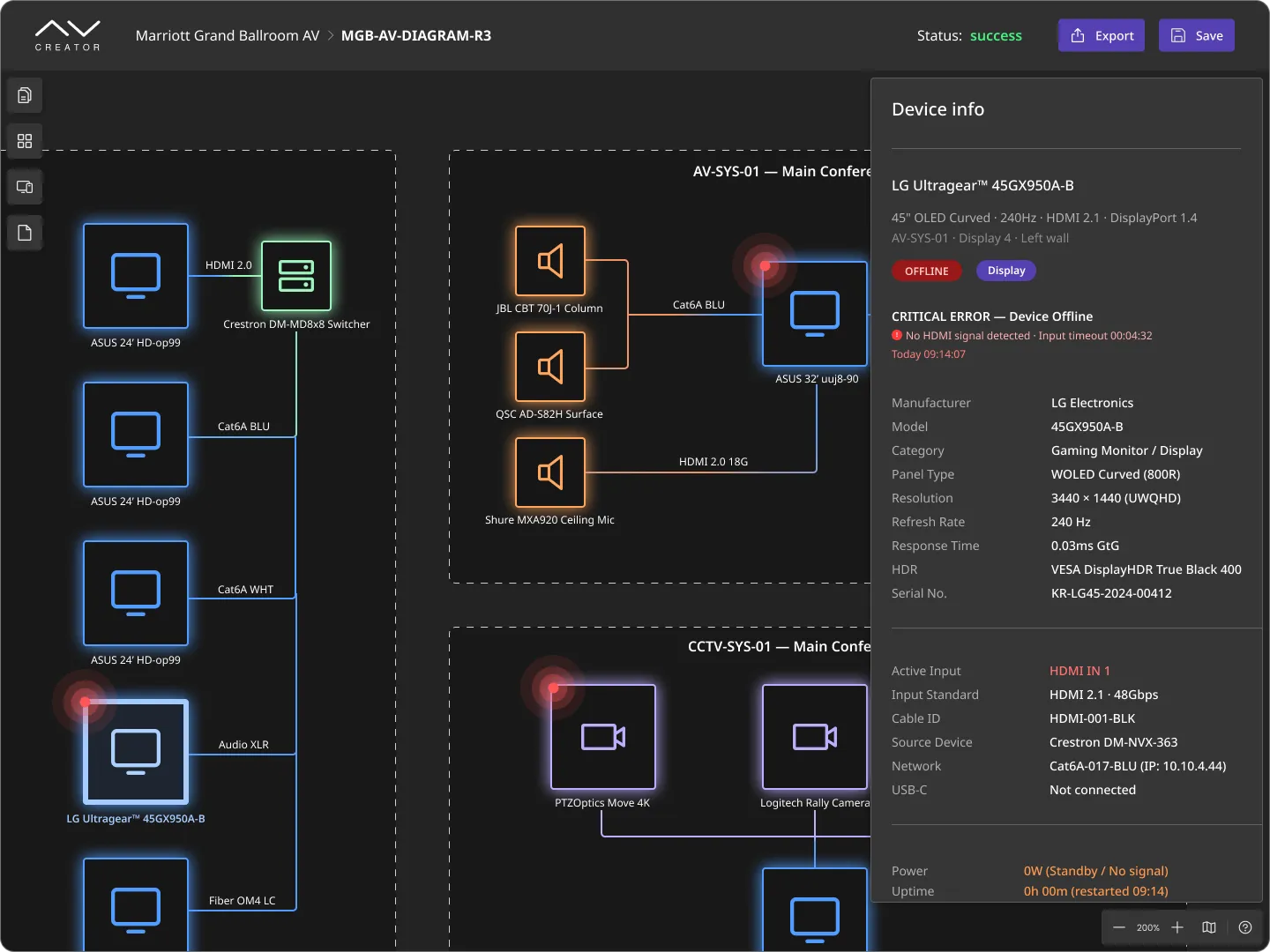
A signal diagram generated automatically from the imported device list, with full specs for the selected component on the right. The status indicator confirms the design passed all built-in validation rules.
6. Automatic document generation (BOM, offers, material lists)
With one click, the platform generates project documents – Bills of Materials, offers, and detailed material lists – directly from the design. No manual copying, no mismatch between the drawing and the paperwork, and faster turnaround on quotes.
Example of use:
After completing the design, the designer generates a complete BOM with one click. It includes all devices, cables, accessories, as well as their quantities and parameters. The system also automatically adds an offer based on current prices from the device database.
7. Automatic updates of related documents after a change in one place
The "update once" feature keeps all project documents inside the platform in sync. Change a device model on the central list, and every diagram, BOM, offer, and piece of documentation updates automatically. You never chase the same edit across multiple files, and nothing slips through with outdated data.
“If I change a device model on the list, I want it to update everywhere right away – in the diagram, the offer, and the documentation. Right now, I have to fix it in several places, and it is easy to miss something.”
– AV systems designer, discovery conversation
8. Creating and editing custom rules
You define your own rules based on project specifics, device constraints, or internal standards. The platform then checks every design against both the built-in rules and your custom ones, catching client-specific requirements and unusual configurations automatically.
Example of use:
An integrator adds a rule that caps cable length for a specific installation type. Whenever a designer exceeds the limit in a project, the system flags the violation before the design is finalized.
Data management and integrations
9. Central database
All equipment information lives in one place – technical parameters, prices, compatibility, and custom attributes. Designers and sales teams work from the same up-to-date catalog, pick compatible devices quickly, and stop hunting for the latest price list or spec sheet.
“When we started the implementation, we had equipment catalogs in several different places – Excel, PDFs from manufacturers, sometimes even photos on a phone. Now everything is in one place, and I do not have to wonder whether I picked the right model.”
– AV integration company owner, post-delivery review
10. Easy data import
You import data from Excel, external quoting tools, and other formats directly into the platform. Work continues without a migration gap, data stays consistent, and nothing is lost in manual copying between tools.
Example of use:
Once the client approves the quote, the designer imports the device list into the platform. The system loads those devices into the workspace catalog and sketches a first-pass schematic from the imported scope. From there, the designer shapes the engineering work – signal flow, rack design, layout – building on that foundation. Re-imports keep the platform in sync as the project iterates between sales and engineering.
11. Integration with external systems (ERP, CRM, quoting tools, inventory, D-Tools, portal.io)
Integration with external systems moves data automatically between the AV platform and the other tools in your company. Devices, offers, inventory levels, and client data stay in sync – the platform becomes the single source of truth across teams.
“Integration with our ERP is a must-have for us. Without it, there won’t be any point in implementing a new tool.”
– Head of delivery, vendor evaluation meeting
Example of use:
A designer sees live inventory levels and prices from the ERP while choosing devices. When the project is approved, orders go straight to the ERP system, with no manual handoff.
12. Export to PDF, DXF, and CSV, plus link sharing for clients and installers
Export the documentation to PDF, DXF, or CSV, or share a live link to selected views. Stakeholders – clients, installers, procurement, subcontractors – each get the current data in the format they need, without the chaos of multiple file versions.
Example of use:
Installers receive a live link to the current drawing, the procurement team pulls the BOM as CSV, and the architect imports the DXF into their CAD file – one export step, three audiences served.
.webp)
A detailed wiring schematic with named cable runs and port-level connections, alongside live rack elevations. Every connection is checked against signal type, port limits, and rack capacity in real time.
13. Two-way data synchronization between systems
Two-way synchronization connects the AV platform with the systems outside it – ERP, CRM, inventory, quoting tools. A change in the platform flows to those systems automatically, and their updates flow back. Procurement, warehouse, and sales operate on the same data as the design team, with no manual re-entry between tools.
Example of use:
When procurement updates a device price in the ERP, the change appears in the AV platform offer automatically. When a designer marks a device as needed, inventory sees the request the same moment.
14. API for integration with other tools
An API connects the AV platform with any system in your company. Teams transfer data, trigger actions, and sync information automatically, with no manual file export or import.
Example of use:
The company has its own project management system and wants an AV project approval to automatically create a task in that system. Thanks to the open API, connecting the two tools is simple – project data, device lists and deadlines are transferred automatically, without any user involvement.
Team collaboration and project governance
15. Live collaboration and asynchronous handoffs
Your team works on the same project in real time or asynchronously – whoever is online sees changes instantly, and anyone joining later picks up where the others left off. Built-in notifications flag new edits, comments, and approvals, so nothing important gets missed across time zones or team handoffs.
"Definitely the real-time sync. I make a change and my colleague sees it straight away – no more ‘are you looking at the same version as me?’"
– AV designer, implementation workshop
Example of use:
On a large AV project, designers edit the diagram together in real time – one adding devices, another updating connections, a third leaving comments. When the design team finishes, the installation team in another time zone picks up the same project, leaves notes, and flags issues. Everyone on the project receives only the notifications that match their role.
16. Commenting on drawings, attaching notes to diagram elements
Commenting on drawings and attaching notes to specific diagram elements makes it possible to quickly share feedback, questions, or suggestions directly in the project context. This makes communication between team members, the client, and the installer more precise.
Example of use:
An installer working on site notices that a few meters of cable are missing to connect a device. They attach a note directly to the relevant place in the diagram, so the designer and the rest of the team immediately see the issue and can respond quickly.
17. Versioning and change history
An audit trail makes it possible to track every change in the project – who changed what, and when. This gives the team full control over the project, makes it easy to return to an earlier version, compare changes or identify the source of errors. This feature improves the security of collaborative work and makes it easier to track responsibility for specific project decisions.
“Before, every change was stressful – does everyone have the latest version, did someone overwrite something? Now everything is in one place, and I do not have to worry about it.”
– Project lead, AV integrator, post-implementation conversation
Example of use:
The client asks about a device-model change weeks after delivery. The designer opens the change history, sees who made it and when, and restores the previous version if needed.
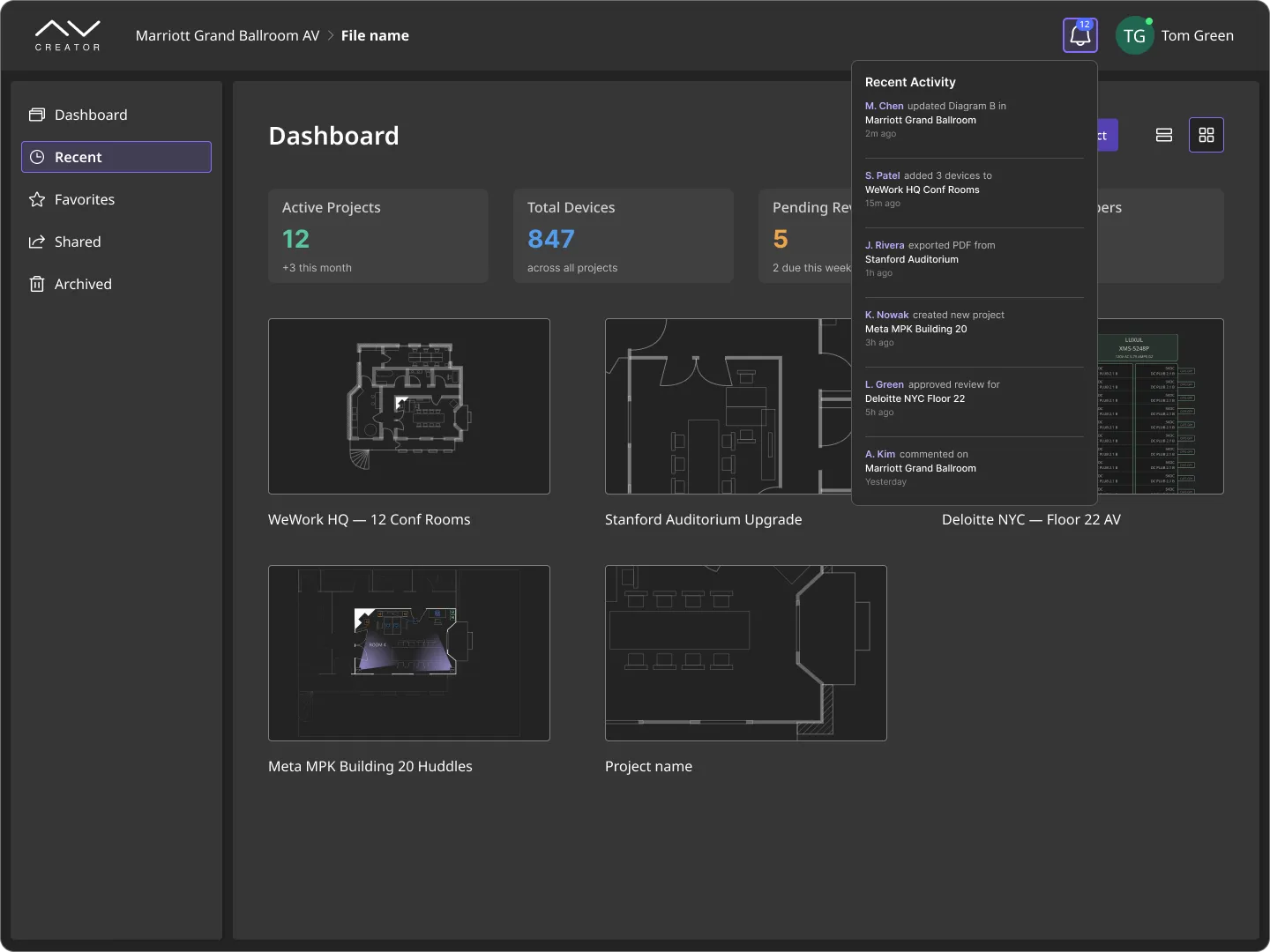
The dashboard view: active projects, device counts, pending reviews, and a live feed of team changes. Each user configures their own version of this screen based on their role.
18. Reusable project templates
Project templates and the ability to reuse them make it possible to start new projects quickly based on proven, ready-made AV system layouts. This feature ensures consistency across implementations and makes it easy to apply company standards and best practices in future projects.
Example of use:
An AV integrator delivering repeat projects picks the right template, adjusts the room-specific details, and generates the full documentation in minutes. Quality stays consistent across dozens of similar installations.
19. User role management
Permissions and user role management make it possible to define exactly who can view, edit or approve specific projects and their elements. This feature improves the security of team collaboration, gives better control over changes and makes it possible to involve engineers, clients, and subcontractors in the same project – each with the right level of access.
“I would like the client to have view-only access, while the technical team can edit and comment. Right now, I have to send separate files to avoid confusion.”
– Project manager, discovery conversation
Customization and cross-device access
20. Workflow flexibility and adaptation to company processes
You configure project stages, custom statuses, and workflows that match how your company actually works – not a template imposed by the vendor. The platform reflects your real processes and adapts across project types and teams.
“Before, we had to adapt to the tool. Now the tool adapts to us.”
– Head of operations, post-implementation conversation
21. Interface customization and personal dashboards
Interface customization adapts the platform to your company brand and to each user's role. The platform ships in your colors, logo, and UI style, with both light and dark modes. On top of that shared look, every user configures a personal dashboard – their active projects, pending approvals, or alerts from the field – so they see what matters to them right after login.
"It would be useful to see what matters to me right after logging in – only my projects or alerts from my part of the installation."
– Installation supervisor, discovery conversation
Example of use:
A company implementing the platform hands over its brand guidelines – colors, logo, UI – and receives both a light and a dark theme. Within that look, a project manager configures a dashboard tracking ongoing implementations and approvals, while a field installer opens a different view that shows only assigned projects and active installation alerts.
22. Cross-device access and field work support
The platform runs in any browser with no install required, and extends to tablets and phones with offline mode. Installers, service technicians, and remote team members access diagrams, documentation, and comments on any device – including places without web coverage, where changes save locally and sync once the connection returns.
"The ability to work offline is a big advantage for us, especially on projects outside the city."
– Field installer, trade show conversation
Example of use:
A new team member joins a project and gets instant access through a browser – no install, no IT ticket, just a login. On site, an installer opens the current diagram on a tablet, marks installed devices, and adds a note about a missing item; even without internet, changes save locally and sync once the connection is restored, so the office sees progress the moment it appears.
Advanced features and innovation
23. AI-assisted design review and optimization
The platform's core diagram generation and validation is deterministic – it does not use AI and does not hallucinate. Your device list maps to a predictable schematic every time, because AV installations cannot tolerate invented connections or AI-generated guesses.
AI sits on top as an optional assistive layer. It reviews designs you already have – suggesting optimizations, flagging inefficiencies, recommending alternative placements, or speeding up search across the device database. Every suggestion is a proposal to accept or reject, never a change applied silently.
“I have already seen a few AI tools, but what matters to me is getting specific suggestions, not just diagrams generated out of thin air.”
– AV systems engineer, trade show conversation
Example of use:
A designer completes a schematic for a large venue using the platform's rule-based generation. With the diagram in place, they open the AI assistant to review it: the assistant highlights three device positions where clustering could reduce cable length, surfaces two comparable projects from the device database for reference, and flags one redundant connection. The designer accepts the cable-length suggestion, ignores the rest, and keeps working.
24. Automatic proposal generation
Automatic proposal generation based on the project makes it possible to quickly prepare a professional commercial offer or implementation proposal. This feature removes the risk of errors, shortens response time to client inquiries and ensures consistency between the technical design and the offer.
Example of use:
After completing the AV system design, the designer generates a commercial offer with one click, including the device list, prices, feature descriptions, and diagram visuals. The document is ready to be sent to the client or further edited by the sales team.
25. Interactive floor planning integration with architectural layouts
Interactive floor planning ties the AV device layout to the architectural plan of the room or building. Designers drag equipment onto a real floor plan, set mounting positions and cable paths in context, and share the layout with architects and facility teams – all from the same platform.
“We used to mark up PDF floor plans by hand and email them to the architect. Now the layout, the diagram, and the BOM stay connected.”
– AV designer, post-implementation conversation
Example of use:
The designer places displays, speakers, and control panels on the imported floor plan, and checks sightlines for each seating configuration. The architect sees the same layout in sync – changes on either side stay consistent.
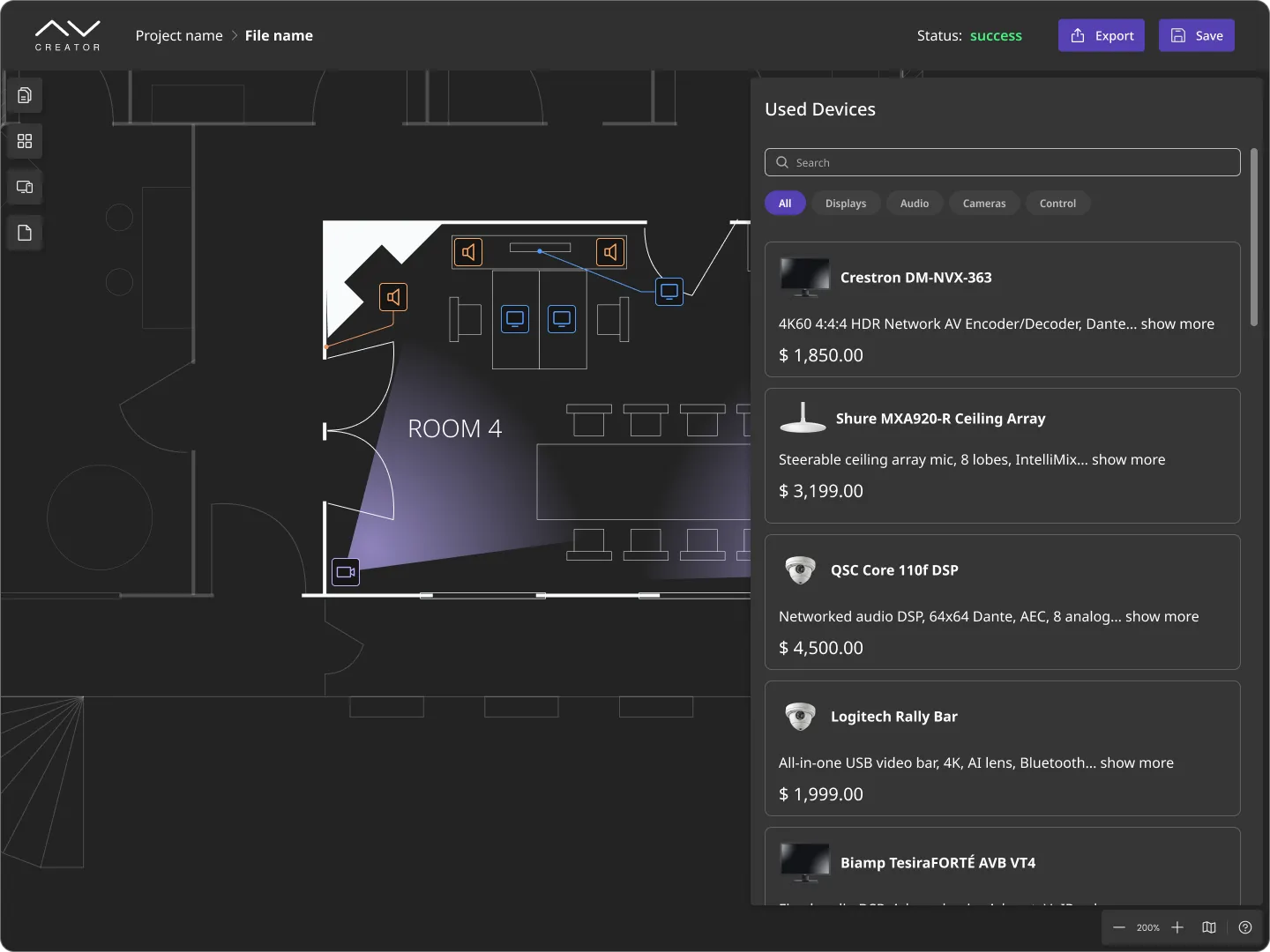
Devices placed on the architectural floor plan, with the running cost list updating from the same selection. Adding or moving a device updates the BOM and project budget automatically.
26. Integration with Building Information Modeling (BIM) and other building management tools
Integration with Building Information Modeling and other building management tools enables data exchange between the AV platform and the systems used by architects, designers, and facility management teams. With integration, AV projects can be automatically embedded in digital building models, and information about devices, connections, and technical requirements stays current and available to everyone involved in the investment process.
“More and more often, clients ask whether the AV project can be integrated with the BIM model, so everything is in one place and data does not have to be moved manually.”
– Solutions director, trade show conversation
27. Augmented reality (AR) room previews for equipment placement
Augmented reality (AR) lets designers and clients preview the AV installation inside the real room before anything is ordered. Using a tablet or phone, the team walks the space with equipment overlaid at full scale. This catches sightline, cable-route, and clearance issues at the design stage instead of on installation day.
“Walking the client through the room with AR ended every 'I thought it would look different' conversation we used to have at handover.”
– AV project manager, post-delivery review
Example of use:
Before finalizing a large conference-room installation, the project manager walks the client through the room with a tablet. The client sees the actual size and position of each display, speaker, and control panel, and asks for a 15 cm shift on one display – caught before procurement.
28. Cost analysis and project budget optimization
Track AV system delivery costs in real time, compare solution options, and find areas where costs can drop without compromising quality. Better input for proposals, tighter control over project profitability, and fewer budget surprises during delivery.
Example of use:
While designing the AV system, the designer analyzes different device configuration options – the system automatically calculates the total cost of each option and suggests where lower-cost components can be used or where the number of devices can be optimized. This helps the company prepare a competitive offer and avoid going over budget during delivery.
29. Post-implementation monitoring and installation management
Post-implementation monitoring and management allows real-time tracking of AV device status, quick issue reporting and efficient service and maintenance management. This ensures full control over system performance, enables fast response to failures and supports planning of service activities, which reduces downtime and improves overall reliability.
Example of use:
After the AV system is installed, the facility manager uses a dashboard to monitor the status of all devices in the building. If a projector or audio system fails, the user reports the issue directly in the platform, and the service team receives the information and can take action immediately.
30. Ability to extend with additional modules
Add modules as your company grows – new functional areas plug into the same platform without replacing what already works. Your processes stay consistent as the scope expands.
Example of use:
A company starts with design and installation management, then adds an inventory module to track stock, and later a service module for repairs and maintenance – all within the same platform.
Feature priority worksheet
Use this table to decide which features matter most for your team. Rate each feature from 1 (not important) to 5 (critical) based on your current workflow and the outcome you expect from a custom platform. The top-rated rows become your must-haves for any AV platform evaluation, RFP, or internal business case.
Case snapshots from AV integrators
All case details here are anonymized to honor confidentiality agreements with clients; full references are available on request under NDA.
A Benelux AV integration company
Before:
Device lists, offers, and technical drawings lived in three separate tools – an inventory portal, Excel for quoting, and AutoCAD for schematics. Every project change required updates in three places, and small mismatches traveled downstream to installation.
After:
A custom AV platform built around the device database. Diagrams generate from the imported device list. Quotes and BOMs update from the same source. Installers receive a live link instead of a PDF that is out of date the moment it is sent.
Outcome:
Fewer installation-stage fixes, a shorter quoting cycle on repeat project types, and a single source of truth across sales, design, and field teams.
A US broadcast technology provider
Before:
Large broadcast installations required dozens of hand-drawn signal diagrams, each reviewed manually by senior engineers. Validation happened late – often at commissioning – when fixes were expensive.
After:
A rule-based validation engine inside the platform catches signal-compatibility and port-limit issues at design time. Senior engineers now review exceptions, not every drawing.
Outcome:
Review time per project dropped materially, and junior engineers deliver schematics that pass the first validation gate.
A repeat-project AV integrator (multi-site office rollouts)
Before:
Every new office installation started from scratch in CAD, even when the AV layout was near-identical to dozens of meeting rooms the team had already shipped across the same client's sites.
After:
Reusable project templates plus an inventory-linked device database. New installations start from a proven meeting-room template, with the platform handling variations (room size, display options, site-specific AV requirements).
Outcome:
Project preparation time for repeat configurations dropped sharply, and quality stayed consistent across implementations.
The most common implementation challenges and barriers
Implementing a new AV platform, even when it brings clear benefits, comes with a range of challenges and barriers that can slow down or complicate the entire process. Understanding these difficulties makes it easier to prepare for implementation, plan actions that reduce risk and support both the team and clients more effectively at every stage of the change.
The most common implementation challenges and barriers reported by clients:
1. Integration with existing databases and tools
Clients often have extensive device, offer, and project databases built up over many years in Excel, inventory portals, or ERP systems. Moving this data into a new platform, keeping it consistent and enabling automatic synchronization is one of the most frequently mentioned challenges.
2. Migration of historical data
Concerns about data loss, the need to manually clean up and organize old files, and the lack of universal import formats can all extend the implementation process.
3. Team resistance to changing tools and processes
Employees used to existing solutions, such as Excel, CAD or email, may be reluctant to adopt new platforms because they fear losing control, having to learn new features, or changing their daily habits.
4. Lack of time for implementation and training
Teams working on current projects often do not have enough time to test a new tool, attend training sessions, or prepare migration materials.
5. Adapting the platform to specific workflows and industry requirements
Every AV company has its own processes, standards, and requirements – the need to customize the platform, create custom rules or integrate with unusual tools can become a barrier to a fast start.
6. Concerns about data security and confidentiality
Moving sensitive information into a new system, especially a web-based one, raises questions about security, backups, and compliance with the company’s IT policies.
What the process of delivering a custom AV platform looks like
The whole process is carried out by the Synergy Codes team in close cooperation with the client. This ensures the platform matches the client’s workflow, technical requirements, and business goals.
1. Discovery
The Synergy Codes team works with the client to understand the business context, technical needs, and workflow. Through workshops and conversations, the team identifies key challenges, goals, and priorities.
2. Design
Based on discovery findings, the Synergy Codes team prepares the platform concept, user flows, and UI/UX designs. The goal is to create a tool that fits real AV workflows and is easy to use.
3. Development
The platform is built step by step, starting with the most important features (like diagram generation, device management, or validation). The development process is iterative, with regular demos and reviews to make sure it matches the client’s needs. Integration with external tools (ERP, CRM, inventory) is planned at this stage.
4. Deployment
After thorough testing, the platform is launched in the client’s environment. This stage includes data migration, integration with existing systems, access setup, and final security checks. Once live, the team monitors platform behavior closely for the first weeks to stabilize performance and resolve any issues that surface only on production data.
5. Onboarding and adoption
A platform only delivers value when the team uses it. Onboarding is phased: your team starts with the features it already needs daily, adds new ones as habits form, and keeps working on real projects throughout. Training is role-specific, and where old habits (Excel, CAD, email) run deep, the transition happens in steps that don't interrupt active work.
6. Maintenance and evolution
Once the platform is live, the team provides ongoing support and further development. This includes fixing bugs, adding new features based on user feedback and adjusting the platform to changing business needs. Clients can choose ongoing cooperation or take over the platform with full documentation and knowledge transfer.
What to expect: timeline and investment
A custom AV platform is a project investment, not a SaaS subscription. Typical timelines for a first-scope build:
Discovery and design: 4–8 weeks. You define priorities and validate the concept before any code is written.
First working version (MVP): 3–6 months. Covers the core workflow your team uses every day.
Full platform with external integrations: 6–12 months, depending on scope and the number of systems to connect.
Budgets scale with scope, but most first-phase AV platform builds fall in the range of a mid-to-large enterprise software project. A discovery workshop – typically the first step and a much smaller commitment – gives you a detailed scope, timeline, and budget estimate before you commit to the full build.
Build your custom AV platform with Synergy Codes
If you recognized your team in the decision framework earlier in this guide, here is who builds these platforms – and what happens next.
Synergy Codes is a team of diagramming experts with 15+ years of experience building workflow editors, diagram tools, and data visualization interfaces. We have delivered 170+ custom diagram platforms for clients ranging from startups to Fortune 500 companies, including a dedicated practice serving AV integrators and system providers Europe, North America, and Asia.
Our work in AV spans custom design platforms for integrators who have moved beyond AutoCAD, XTEN-AV, and D-Tools – and needed a tool built around their own workflow, not the vendor's assumptions.
What you get when you work with us:
Diagram-engine expertise. We develop our own diagramming libraries (Workflow Builder, Overflow, ngDiagram), so our AV platforms run on proven components, not reinvented wheels.
A discovery-first process. Every build starts with workshops and conversations that shape the tool around your workflow, not the other way around.
No vendor lock-in. You receive source code and perpetual licenses. The platform is yours to extend, migrate, or hand over to another team.
AV-specific track record. Client references available on request – from Benelux integrators to US broadcast technology providers.
Want to see how this could look in your company? Book a 30-minute discovery call.
Let’s talk about your AV design workflows and goals – and how custom-built software can move both forward.

Not a fan of contact forms?
Reach out to Maciej on LinkedIn
Maciej Teska
CEO at Synergy Codes