React Flow: Everything you need to know

In this guide, you'll learn all essential concepts about React Flow. You're new to the topic? This React Flow tutorial will get you started!

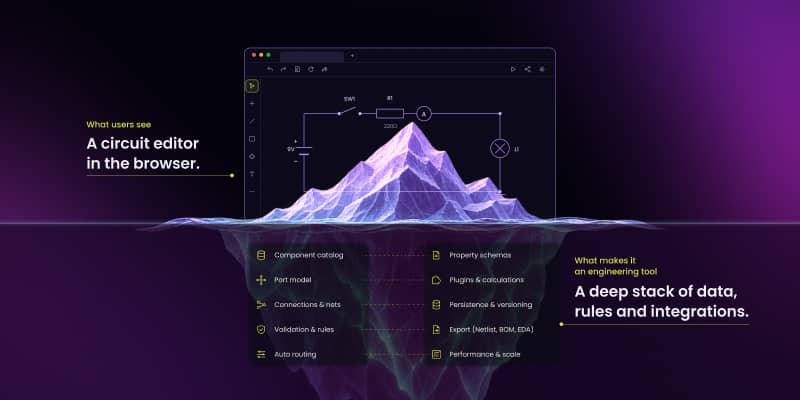
React Flow provides a flexible way to build interactive diagrams in React by combining nodes, edges, and customizable components. Its virtualization feature renders only what’s visible – improving performance in large projects. This architecture simplifies building editors, workflow tools, and data-driven UIs with clean state management and full styling control.
This guide is designed for developers and newcomers interested in building interactive diagrams. It covers essential topics, including setup, key features, core concepts, and practical use cases of React Flow.
React Flow is a powerful library for building interactive diagrams and a key tool in modern data and workflow visualization. It enables you to create dynamic, user-friendly diagrams that make complex information more accessible and actionable.
In this guide, you'll learn all essential concepts about React Flow. You're new to the topic? This React Flow tutorial will get you started!
What is React Flow?
If you've ever worked with flowcharts, diagrams, or visual workflows, you know how useful they are for understanding complex ideas. The React Flow library provides the essential building blocks – like nodes, edges, and drag-and-drop – to help you create custom visualizations on the web.
React Flow is a popular, open-source React library used for building interactive graphs, flowcharts, and node-based editors in web applications. Developers use React Flow to create interactive dashboards and diagrams showcasing complex data relationships in a user-friendly manner.
Definition and explanation of React Flow
Think of a family tree:
- Each family member is a node (a box with a name).
- Each connection between parents and children is an edge (a line linking them together).
- Together, they create a clear diagram showing relationships and generations.
Just like a family tree, React Flow helps structure information visually, making it easier to understand connections and interactions.
React Flow is a JavaScript library for creating interactive diagrams in React applications. Think of it as a digital whiteboard where you can place elements (called nodes) and connect them with lines (called edges) to show relationships and flows. The React Flow library makes it easy to build, customize, and control diagrams inside a web application.
Key features and benefits of using React Flow in application development
Why use React Flow instead of manually drawing diagrams with basic HTML and CSS?
- Drag-and-drop interactivity – Users can move elements around easily.
- Connections & relationships – It allows elements to link together dynamically.
- Event handling – It enables user interactions, like clicks, drags, and zooming.
- Integration with React – Works seamlessly in React projects.
In short, React Flow transforms static diagrams into fully interactive experiences, perfect for apps that need visual data representation. The library is frequently used in workflow automation, data visualization, and process mapping.
How does React Flow compare to other libraries? Get to know alternatives to React Flow
You might be wondering, "Is React Flow the only option for building diagrams?'" No – there are other tools and libraries too, but React Flow stands out in four major ways. See a comparison with three other libraries below.
If you're working with React, React Flow is one of the best options due to its seamless integration and ease of use. React Flow alternatives like other libraries may be preferable for specific use cases, such as GoJS for enterprise-level customization or Cytoscape.js for basic automatic layouts.
Exploring React Flow: GitHub
React Flow website is the best place to find process documentation, code examples and full tutorial. Moreover React Flow GitHub repository is great to open issues, contribute to the project and access the latest updates, and discussions. If you have more questions about this library or seeking an answer to a specific issue, you can also visit the React Flow discord community.
Get free React Flow ebooks on performance, accessibility, state, and collaboration
Download now.png)
Setting up React Flow
Now that you know what React Flow is, let's talk about how to set it up in your project.
Prerequisites for using React Flow
To use React Flow, you need: basic knowledge of React, a React project, installed Node.js (for tooling and package manager).
Step-by-step guide to installing React Flow
To set up React Flow follow these steps:
- Open your terminal
- Install React Flow – Use a package manager like npm or yarn to add React Flow to your project.
- Add <ReactFlow> component to your code – Include React Flow in your project so you can start building diagrams.(Check how to build a flow)
- Create a basic diagram – Set up nodes and edges to display a simple flowchart.
- Run your app – Open your project in a browser and see your first interactive diagram in action.
Once you complete these steps, you'll have a basic React Flow diagram set up in your project. Now, let's explore its main building blocks.
Core concepts of React Flow
Understanding the core components of React Flow is essential for building dynamic and efficient diagrams. This section will break down the key elements: nodes, edges, elements, and layouts – explaining their purpose, types, and how they work together to form interactive diagrams.
1. Nodes
A node is the most fundamental component in a React Flow diagram. Think of it as a single object in a flowchart, representing a task, data point, or decision.
What are nodes?
Nodes are interactive components that hold information and can be styled, customized, and moved around. They represent elements such as:
- Steps in a workflow, e.g., approvals in a document process.
- Users in a network, e.g., people in an organization chart.
- Devices in an IoT system, e.g., sensors in a smart home.
Types of nodes
- Default nodes – Standard rectangular blocks that display labels and data.
- Custom nodes – Highly customizable react components (like buttons, icons, form elements, or designing input/output nodes if needed).
How to use nodes in a React Flow diagram
Nodes can be added, moved, and styled to improve the diagram's usability. Each node is a React component so styling – like colors, icons, or labels – is handled directly through CSS.
Example: Imagine building a customer support process. The process might involve:
- A user request node (customer submits a ticket).
- A support agent response node (agent reviews and replies).
- A resolution node (case is closed or escalated).
Each of these would be represented as different types of ReactFlow nodes.
2. Edges
Nodes in a diagram don't just exist in isolation – they need to be connected to show relationships and flow. That's where React Flow edges come in.
What are edges?
An edge is the line that connects nodes, representing the relationship between them. Edges define how data moves and how actions progress within a system.
Types of edges
There are multiple React Flow edge types to choose from, depending on how you want your diagram to look:
- Straight edges – Simple direct connections between two nodes.
- Curved edges – Smooth, flowing lines that improve readability.
- Step edges – Angular connections, useful for structured layouts.
- Custom edges – Fully customizable React Flow edges with colors, labels, or animations.
How to connect nodes with edges
Edges are drawn between source nodes and target nodes, creating a flow of information.
Example: Imagine designing a company hierarchy chart:
- The CEO node connects to department heads using straight edges.
- Department heads connect to employees using curved edges to create a clean look.
Edges are dynamic in React Flow: With React Flow, edges can also be dynamically added or removed, making it easy to modify diagrams as processes evolve. This is particularly useful in React Flow builders and process automation tools.
3. Handles
In React Flow, handles are the connection points on a node where edges can be attached. They determine how and where connections happen within your diagram.
What are handles in React Flow?
Handles let you define whether a connection point is a source, a target, or both, giving you control over the direction of the flow. You can also customize their style and position, making it easy to match your diagram's design and logic.
Example: When building an AI chatbot decision tree, each response node might have a bottom source handle to link to the next step, while question nodes might have multiple target handles to receive incoming paths.
4. Layouts
When working with large or complex diagrams, arranging nodes manually can become a challenge. While React Flow doesn't include any built-in layouts, it can be integrated with third-party layout engines to automate positioning and improve readability. React Flow doesn't include ready-made layout options, but it's flexible enough to let you connect it with external tools that help arrange your diagrams automatically. These setups require a bit of custom coding, but they can make your diagrams much easier to read and manage. You can find examples of such integrations on the React Flow website. These examples use custom code and are not officially maintained by the React Flow team, but they offer a great starting point for building your own layout logic.
To learn more, see building usable and accessible diagrams with React Flow.
Customizable React Flow – built in options
The React Flow diagram library provides basic nodes and edges, but adding colors, shapes, and icons helps improve readability and enhances user experience.
Styling nodes
A node is a building block of your diagram, and its appearance can be customized to make it clearer and more informative.
Example: Think of a traffic light. Each light (red, yellow, and green) represents a different action. Without colors, they wouldn't be effective.
Just use React Component with CSS – you can achieve anything you can imagine – RF won't slow you down
Styling edges
Edges are the connections between nodes, and their design influences how relationships are understood.
Example: Think of a road map. Highways might be thicker and red, while smaller roads might be thin and gray to indicate importance.
Ways to style React Flow edges:
- Color coding – Use different colors for different types of relationships.
- Line styles – Solid, dashed, or curved lines help indicate flow type.
- Animations – Moving edges can represent live data updates or process direction.
React Flow custom node and React Flow edge types
React Flow allows you to go beyond default nodes by creating customizable nodes and edges tailored to your specific needs. Basically any React Component including 3rd party components like charts, videos etc. you can style them with CSS.
React Flow edges don't have to be just lines. You can make them more functional by adding:
- Labels to describe relationships between nodes.
- Arrows and markers to indicate direction or decision points.
- Custom styling to match your application's design.
Interactive diagrams – drag-and-drop, zoom, click events
One of the biggest advantages of React Flow is interactivity. Users can drag nodes, zoom in and out, or click elements to trigger events. Here are some default, but very useful options.
Enabling drag-and-drop
By default, React Flow nodes can be moved around with the mouse. If you want some nodes to stay fixed while others remain movable, you can adjust the settings accordingly.
Enabling zoom and pan
Users might need to zoom in to see details or pan around a large React Flow diagram. The library includes built-in support for this, making navigation intuitive and effortless.
Detecting click events
You might want to trigger an action when a node is clicked, such as opening a detailed view or displaying additional data. React Flow components make it easy to add interactive elements that respond to user actions.
React Flow state management
One of the most important aspects of using the library effectively is understanding how to manage state. In a React Flow every interaction – adding nodes, removing edges, or updating node properties – affects the state. Handling these changes efficiently ensures your diagram remains smooth and responsive. When building applications with React Flow, every node and edge lives in a state. Poor React Flow state management can lead to performance issues, unnecessary re-renders, and difficulty in tracking user interactions.
React Flow includes a built-in state system that works great for simple use cases. This is called uncontrolled state, and it means you don't need to manage anything yourself. For more advanced needs, you can switch to a controlled state approach. This gives you full control over what happens in the diagram and lets you sync it with your app's main state. React Flow uses the library Zustand to manage its internal state. If you want to keep everything consistent, especially in larger apps, you can also use Zustand to manage state outside of React Flow, so everything works together smoothly.
Want to learn more? Check state management in React Flow.
Performance optimization in React Flow
As your React Flow diagram grows in complexity, you may notice slowdowns. This happens because every movement, connection, or update requires recalculations. However, optimizing performance ensures that even the most complex and large diagrams remain responsive.
One unique advantage of React Flow is its built-in support for virtualization. This feature ensures that only the elements currently visible on the screen are rendered, instead of the entire diagram. Enabling it is as simple as setting the <onlyRenderVisibleElements> property, and it can significantly boost performance when working with large and complex graphs.
In addition to virtualization, React Flow also benefits from React’s virtual DOM. Instead of updating the real interface directly, it first processes changes in a lightweight, virtual copy. This allows the library to redraw only the components that truly need updating, keeping interactions smooth and responsive even with large datasets.
Why does React Flow get slow?
Imagine you have a whiteboard where you place boxes (nodes) and connect them with lines (edges). If you move one box, you only want that box to be updated / re-rendered. But sometimes, React Flow refreshes everything instead of just that one box. This makes the app slow and laggy.
Every time a node moves, following actions may happen based on custom usage of Recat Flow:
- Only moved node is rerendered (which is fine).
- All other nodes are refreshed, even if they didn't change (bad!)
- Whole diagram is Refreshed (very bad!)
Think of a smartphone screen. When you swipe to unlock, you don't want the whole phone to restart – you just want the lock screen to move away. Bad practices in using ReactFlow components or poor custom state management may restart the entire phone instead of just unlocking it. So make sure only the changed part updates instead of the entire diagram, and follow best practices – learn more about them and how to boost RF performance here: Optimizing React Flow performance.
Real-time collaboration in React Flow
Modern applications often require real-time updates, allowing multiple users to edit the same React Flow diagram simultaneously. Whether you're building a workflow automation tool or a collaborative mind map, real-time syncing ensures smooth interactions across users.
Why does real-time collaboration matter?
- Instant updates – Changes appear immediately, so users always see the most up-to-date version.
- Seamless teamwork – Multiple users can add or remove React Flow nodes and edges without disrupting each other.
- Effortless layout adjustments – Modifications happen in real time, ensuring a smooth workflow.
- Increased productivity – Teams can collaborate without waiting for manual refreshes or file exchanges.
- Coordinate better in remote teams – Everyone stays aligned, no matter where they are.
Use cases and applications of React Flow
The React Flow library is widely used to create interactive diagrams, workflows, and data visualizations. Here are key areas where React Flow enhances projects and a few application examples.
1. Workflow automation and process management
Organizations use React Flow builders to design and automate workflows, streamlining business operations and improving efficiency.
- Task management tools – Automating workflows in project management applications.
- Approval processes – Visualizing document review and approval steps.
- Business process automation – Optimizing workflows for HR, finance, and IT operations.
App example: Workflow Builder
Workflow Builder is a no-code platform that empowers teams to automate processes using visual flows powered by React Flow. It lets users build workflows through a drag-and-drop interface, connecting apps, databases, and triggers without writing a single line of code. Workflow Builder makes automation accessible to non-technical users while remaining flexible for developers. React Flow enables the visual logic engine behind it, turning business processes into diagrams that are easy to understand, modify, and deploy. It's a prime example of how visual tooling can remove bottlenecks and streamline operations across entire organizations.

2. Data visualization dashboards
Businesses and analysts working with complex data sets use React Flow diagrams to organize and display information visually.
- Financial dashboards – Tracking transactions and market trends.
- Healthcare analytics – Visualizing patient data and medical records.
- Sales pipelines – Mapping customer journeys from lead generation to conversion.
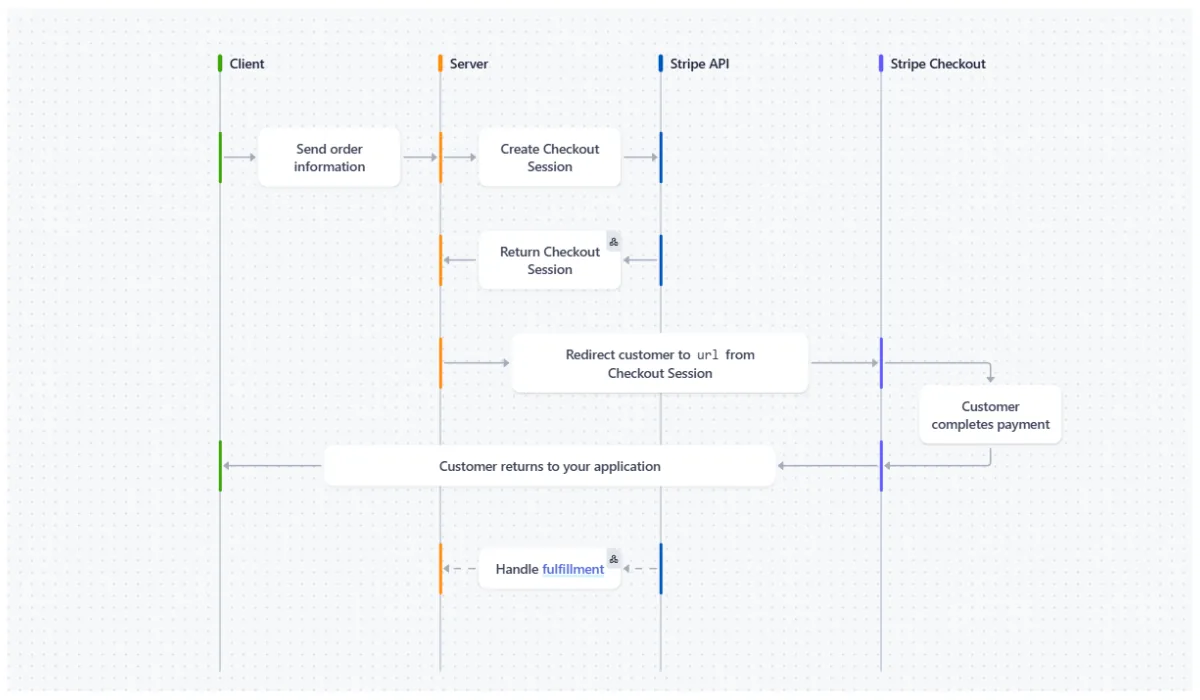
App example: Stripe
Stripe integrates React Flow into its process documentation to visually explain how payments, APIs, and user flows interact across its ecosystem. These interactive tool transform dense, technical information into something approachable and easy to follow. By illustrating complex systems like payment authentication or webhook logic, React Flow helps Stripe guide developers through mission-critical setups. It's a great example of how React Flow enhances data understanding and supports fast decision-making – even in highly regulated, data-heavy industries like finance.
3. Network and system architecture mapping
IT professionals use React Flow components to design network infrastructures, server architectures, and cloud-based applications.
- Cloud infrastructure diagrams – Mapping servers, databases, and APIs.
- Cybersecurity monitoring – Tracking system vulnerabilities and access control.
- DevOps pipelines – Visualizing CI/CD workflows for software deployment.
App example: Supabase Schema Visualizer
Supabase uses React Flow to help developers see how their databases are built. With the Schema Visualizer in Supabase Studio 3.0, you can view tables, columns, and how everything connects – all in one place. This makes it much easier to understand the structure of data, fix mistakes, and show new team members how things work. Due to React Flow, something that used to become less complex.

4. AI and machine learning pipelines
React Flow for AI applications helps visualize machine learning models, data processing steps, and neural networks.
- AI model training workflows – Displaying different steps in model development.
- Deep learning visualization – Showing layers in neural networks.
- Data preprocessing pipelines – Mapping input sources and feature selection.
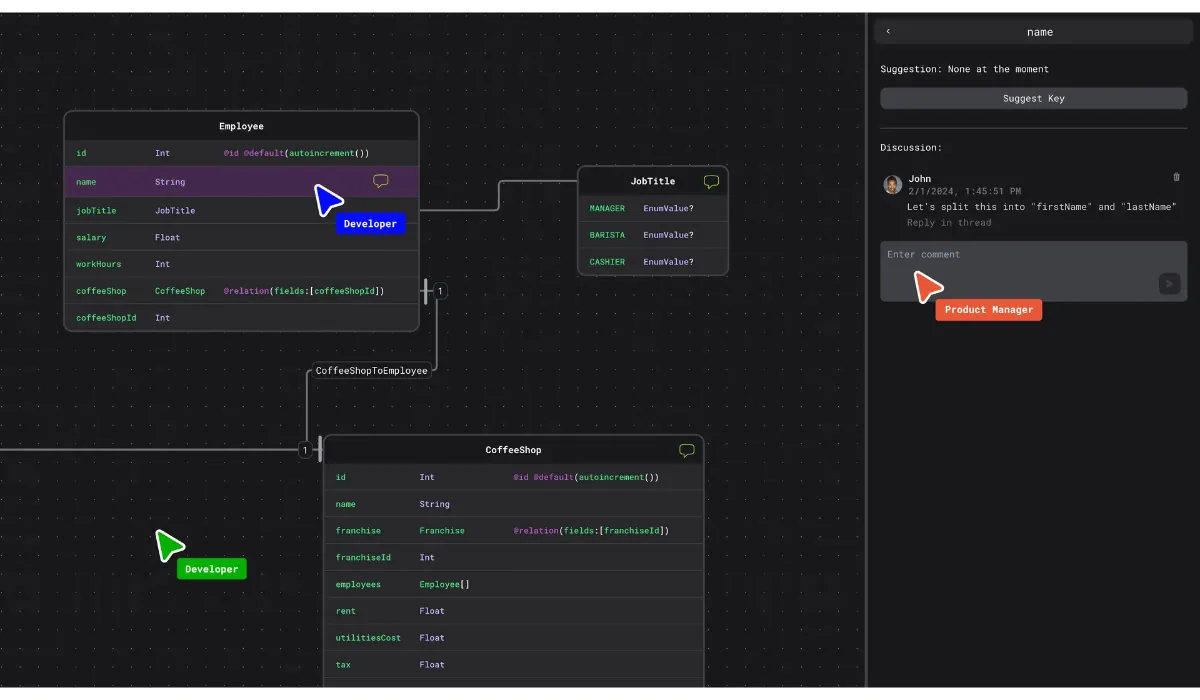
App example: Hubql
Hubql makes it easier for engineering teams to build, understand, and share data models. It uses React Flow to show how different parts of a project – like schemas, datasets, and logic – connect and work together. This is especially useful for AI and machine learning workflows, where many steps need to happen in the right order. With Hubql, teams can map out the full pipeline, from data preparation to model deployment, in a clear visual way. It improves teamwork, and makes the whole process easier to manage and scale.
5. Mind mapping and brainstorming tools
Mind-mapping applications rely on React Flow chart libraries to help users organize thoughts and ideas.
- Brainstorming sessions – Structuring ideas into visual networks.
- Educational tools – Helping students and professionals outline concepts.
- Content planning – Organizing blog posts, books, or marketing strategies.
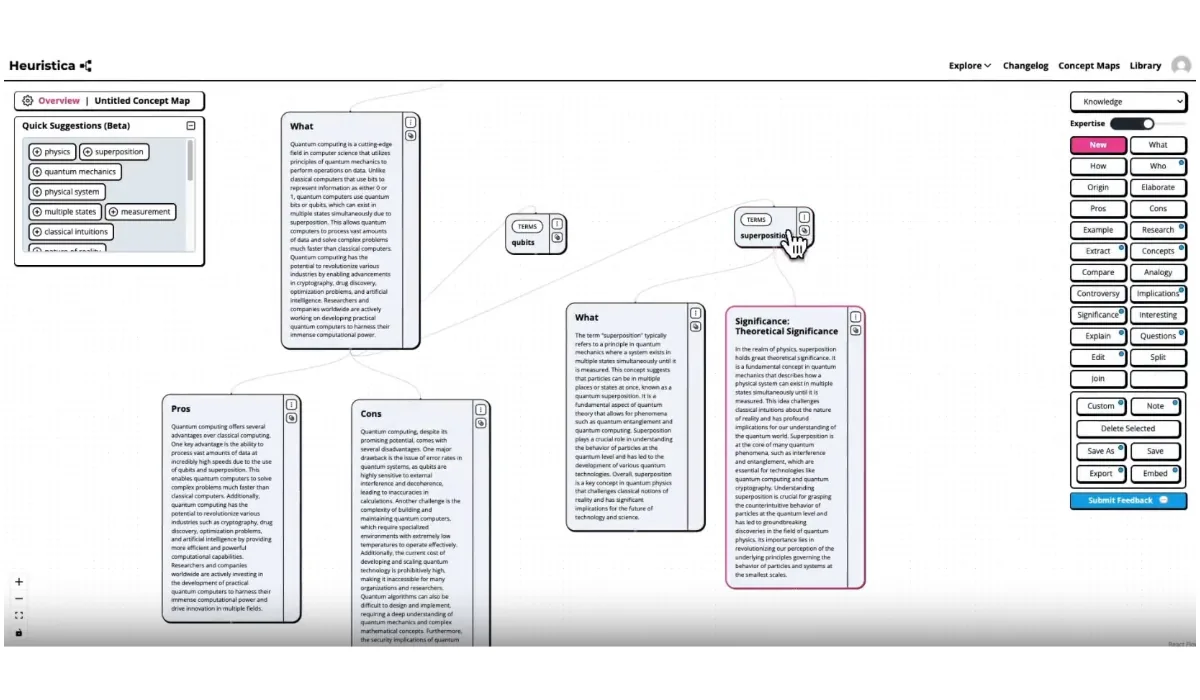
App example: Heuristica
Heuristica leverages React Flow to turn abstract thoughts into structured visual maps. Ideal for creative professionals, strategists, and educators, the platform allows users to freely explore ideas by connecting concepts in a non-linear space. With features like node clustering, drag-and-drop structuring, and custom styles, Heuristica demonstrates how React Flow supports open-ended thinking and collaborative brainstorming. Unlike static diagrams, these mind maps evolve with you – making them a perfect tool for capturing and refining ideas during early-stage planning or innovation workshops.
6. Interactive learning and e-learning platforms
Education platforms use React Flow components to create interactive learning materials that engage students.
- React Flow tutorials for programming – Teaching coding logic through flowcharts.
- History and geography visualizations – Connecting historical events or geographical data.
- Mathematical modeling – Illustrating complex formulas and equations.
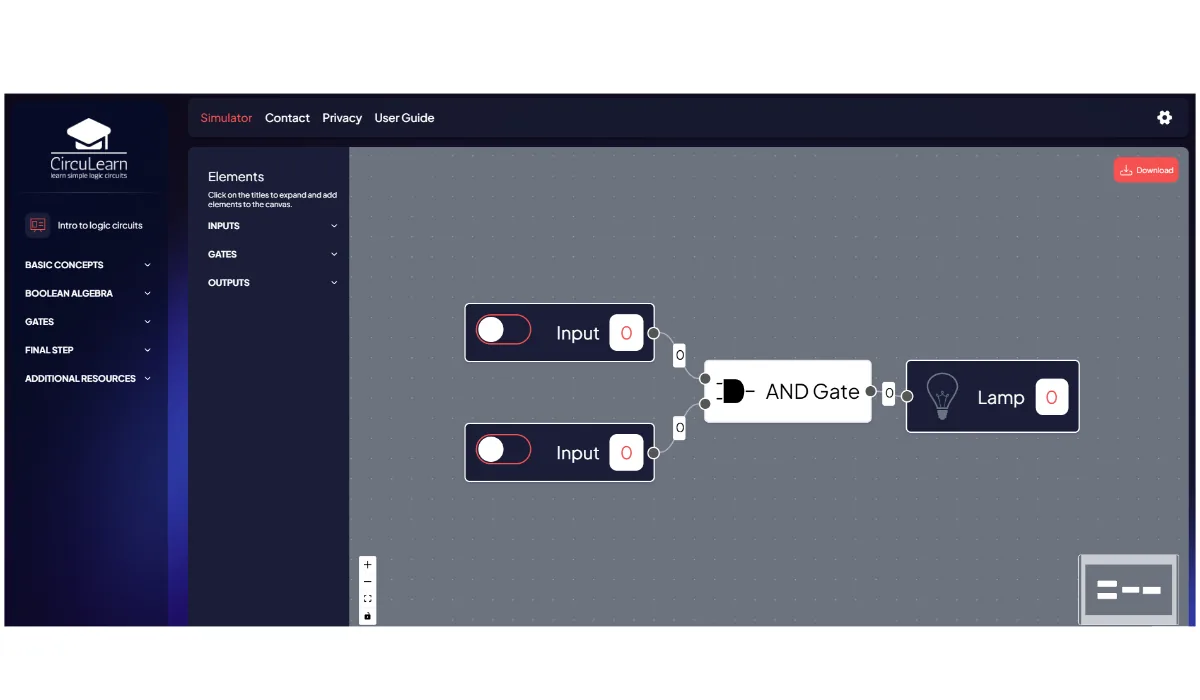
App example: CircuLearn
CircuLearn logic simulator teaches students how digital circuits work by letting them build and test real logic gate configurations on screen. React Flow powers the dynamic interactions between elements, allowing students to experiment and instantly see the outcome. This hands-on experience deepens understanding in ways that static diagrams can’t match. It’s a powerful use of React Flow in education, turning passive content into active learning that’s both intuitive and engaging.
7. App development planning
Developers use React Flow diagrams to plan game logic and app user flows, ensuring smooth design and implementation.
- Game mechanics design – Mapping in-game decision trees.
- App navigation flows – Planning UI/UX structures.
- User behavior tracking – Understanding how users interact with applications.
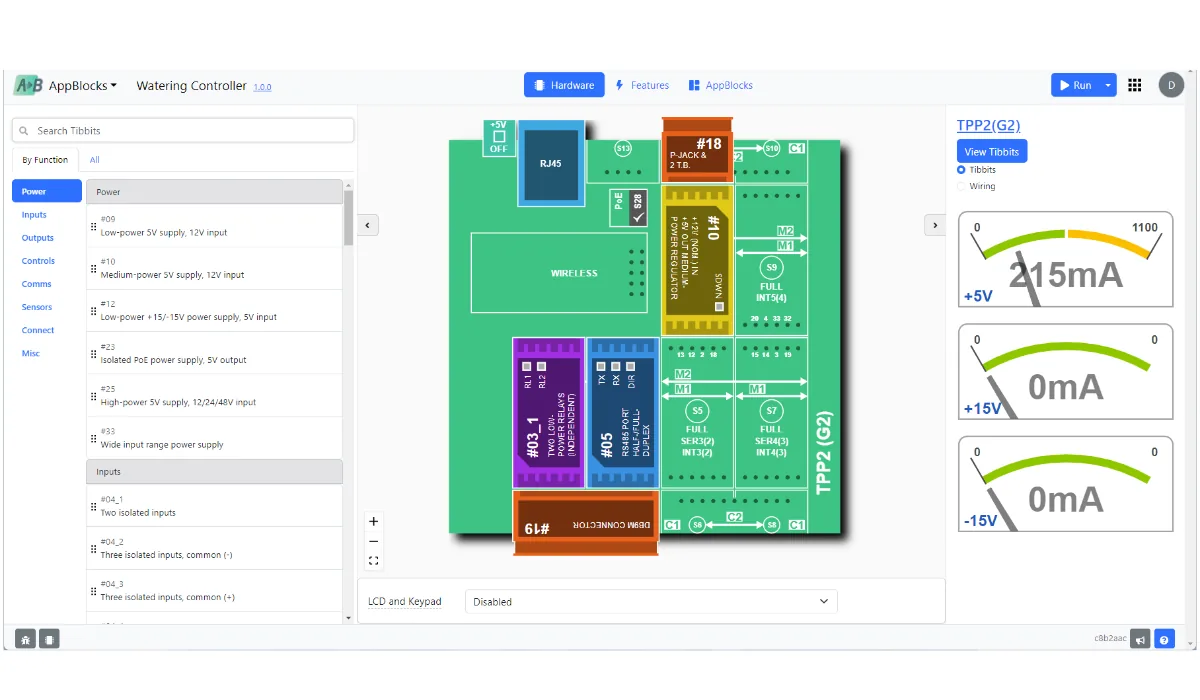
App example: AppBlocks
AppBlocks uses React Flow to let developers visually plan out the logic and structure of their applications before they write a single line of code. With drag-and-drop blocks representing events, triggers, and workflows, users can design entire applications – especially in the IoT and embedded systems space. React Flow makes it possible to test and iterate ideas faster, catch flaws early, and hand off visual specifications to dev teams with confidence. It's a great example of how React Flow supports design thinking in software planning.
Wrap up: Why use React Flow?
React Flow is a powerful, flexible library for building interactive diagrams.This library provides an unmatched combination of flexibility and ease of use. By following best practices and leveraging its powerful customization options, you can create highly interactive and scalable visual applications. Now that you understand what React Flow is and how to use it, it's time to put it into action! Start building, experimenting, and optimizing your React Flow diagrams today.
React Flow: For whom?
React Flow is perfect for developers, businesses, and data professionals who need to create interactive tools: diagrams and visual workflows. It's widely used by:
- Developers – To create drag-and-drop interfaces, visual editors, and data flow systems.
- Business teams – For mapping processes, managing customer pipelines, and optimizing workflows.
- Data scientists – To visualize AI models, analytics pipelines, and network structures.
- Educators – For interactive learning tools, React Flow tutorials for coding, and e-learning platforms.
Best uses for React Flow
React Flow is ideal for creating dynamic and interactive graphs and visualizations. The most common use cases include:
- Workflow automation – Mapping out tasks, approvals, and processes.
- Data visualization – Organizing and displaying complex datasets.
- AI and machine learning pipelines – Showing model training and data flows.
- Network and system architecture – Designing cloud infrastructure and IT systems.
- Mind maps and brainstorming tools – Structuring ideas and concepts visually.
React Flow makes it easy to design, customize, and manage flow-based interfaces across different industries. Check its all possibilities with Synergy Codes' team!
- What is React Flow used for?
React Flow is a library for building interactive, node-based diagrams. It provides built-in tools for rendering, connecting, and managing nodes and edges, so teams can focus on the logic rather than low-level diagramming details.
- Do I need advanced React skills to use React Flow?
No – basic knowledge of React is enough. React Flow provides many built-in components, so you can create simple diagrams quickly and expand them over time.
- How do I start working with React Flow?
Start by installing the library, adding a canvas, and defining nodes and edges. The article walks through the setup step by step, including a minimal working example.
- Can React Flow handle large diagrams?
Yes – React Flow is designed to work smoothly even with complex and large diagrams. It uses virtualization to render only the elements currently visible on the screen, which greatly improves performance. This means you can create diagrams with hundreds or thousands of nodes and edges without slowing down the interface. You can also see how React Flow performs in a real, large-scale setup by exploring Workflow Builder: https://www.workflowbuilder.io/
- What can I customise in React Flow?
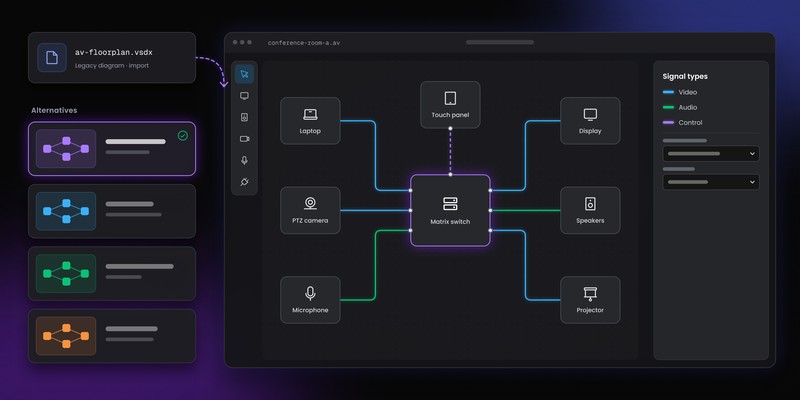
React Flow gives you extensive freedom in customization. You can define how nodes look – their shapes, colors, icons, or internal content – and style edges with straight, curved, or animated lines. You can also control connection handles and user interactions such as dragging, selecting, or connecting elements. For teams looking to extend these capabilities into collaborative visual documentation or interactive user flows, explore how Overflow brings React Flow–style visualization into professional design environments.
Frontend Developer with over 10 years of experience building web applications, specializing in React, UX, UI, and data visualization. Has worked on diverse projects from e-commerce to video streaming platforms.

Find how we can help you enhance your software and win more deals
Contact us to discuss your project. After you submit the form, we’ll get in touch with you within 48 hours to arrange a call.



.jpg)