AI in PCB and circuit design: what's real, what's hype

AI can pick parts, draft schematics and flag review items. See which parts of PCB design it really covers and what stays under engineer control.

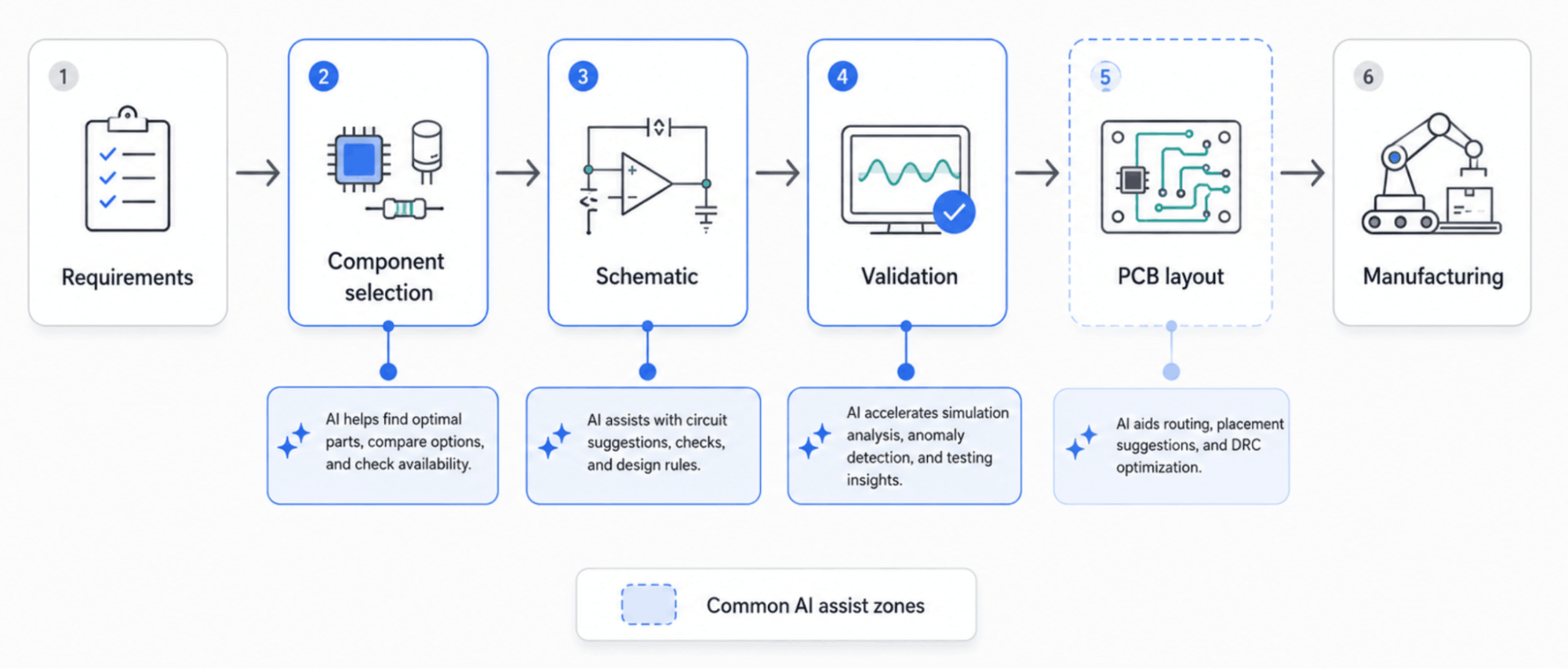
AI already speeds up component research, architecture drafts, schematic generation and design review, and some products reach into placement and routing. As of August 2026, no product covers requirements through manufacturing without engineer review. The practical split: AI suggests, a deterministic circuit model stores the design and specialist EDA keeps the engineering stages.
"AI designs your PCB" makes a good headline. The real design flow is harder to compress because component selection, schematic capture, verification, board layout and manufacturing are separate engineering jobs.
AI already helps with part research, requirement-to-architecture work, schematic generation and design review. Some products also reach into placement and routing. For teams deciding whether to adopt one of these products or build a design tool of their own, the useful question is where automation enters the process and what stays under engineer control.
That distinction also explains where custom circuit design software fits. A company may not need another general-purpose EDA product. It may need a design surface built around its own component catalog, rules, brand and commercial workflow.
What AI in PCB and circuit design means today
AI in electronic design automation covers distinct jobs rather than one uniform "AI PCB design" category. A system may rank components against electrical and supply-chain constraints, turn requirements into candidate circuit blocks, create a schematic starting point, flag review items or assist with physical layout.
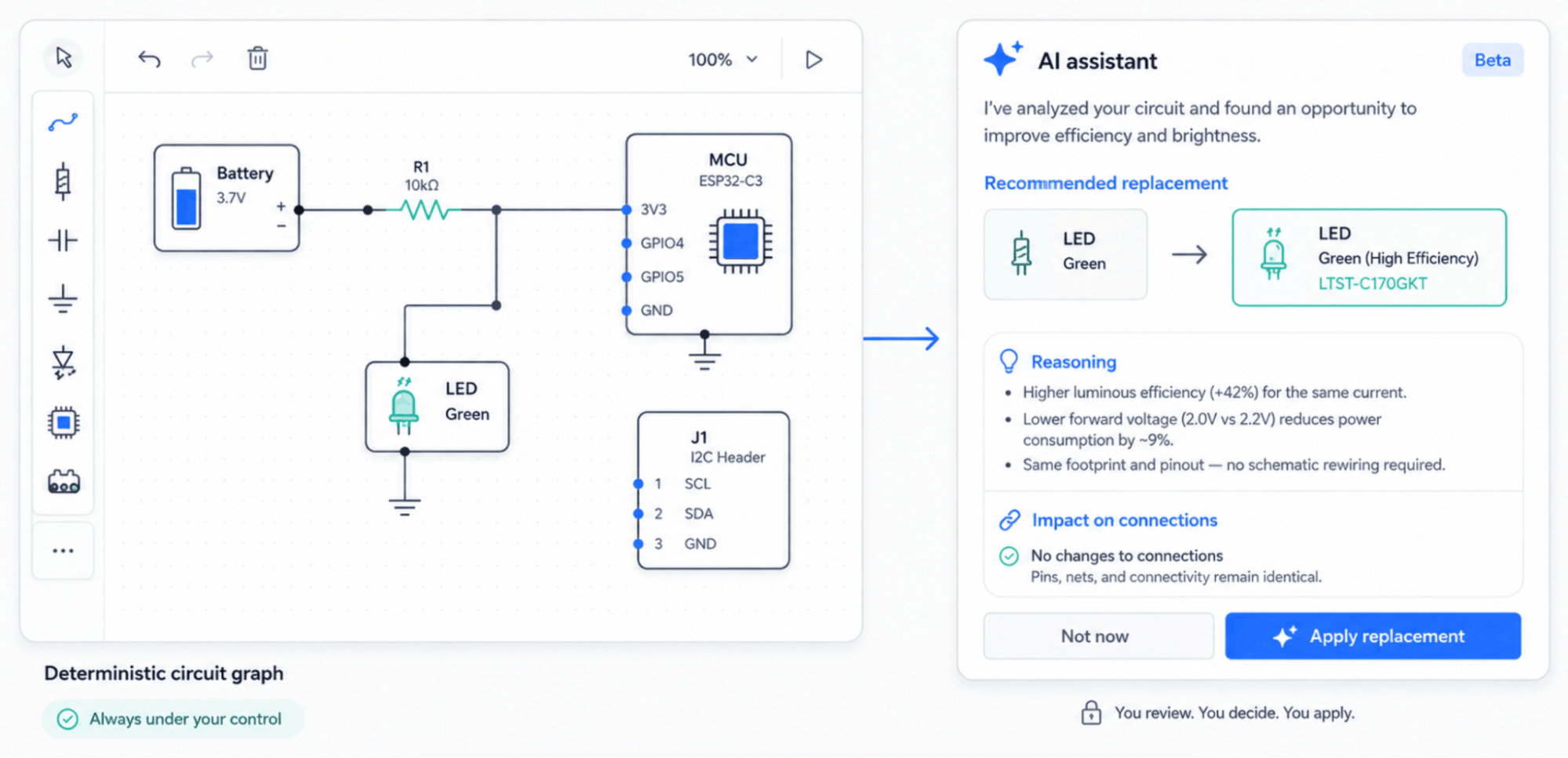
The useful division is not AI versus no AI. It is generated suggestion versus deterministic engineering model. A recommendation can be probabilistic; the component identity, pin connection and downstream design data cannot be.
Current products commonly target five areas: component research, architecture generation, schematic assistance, design review and placement or routing. For the logical side of the flow, see what schematic capture is and what its output contains. For the implementation problems inside a browser editor, see the hard parts of a web-based schematic editor.
The AI circuit design landscape in August 2026
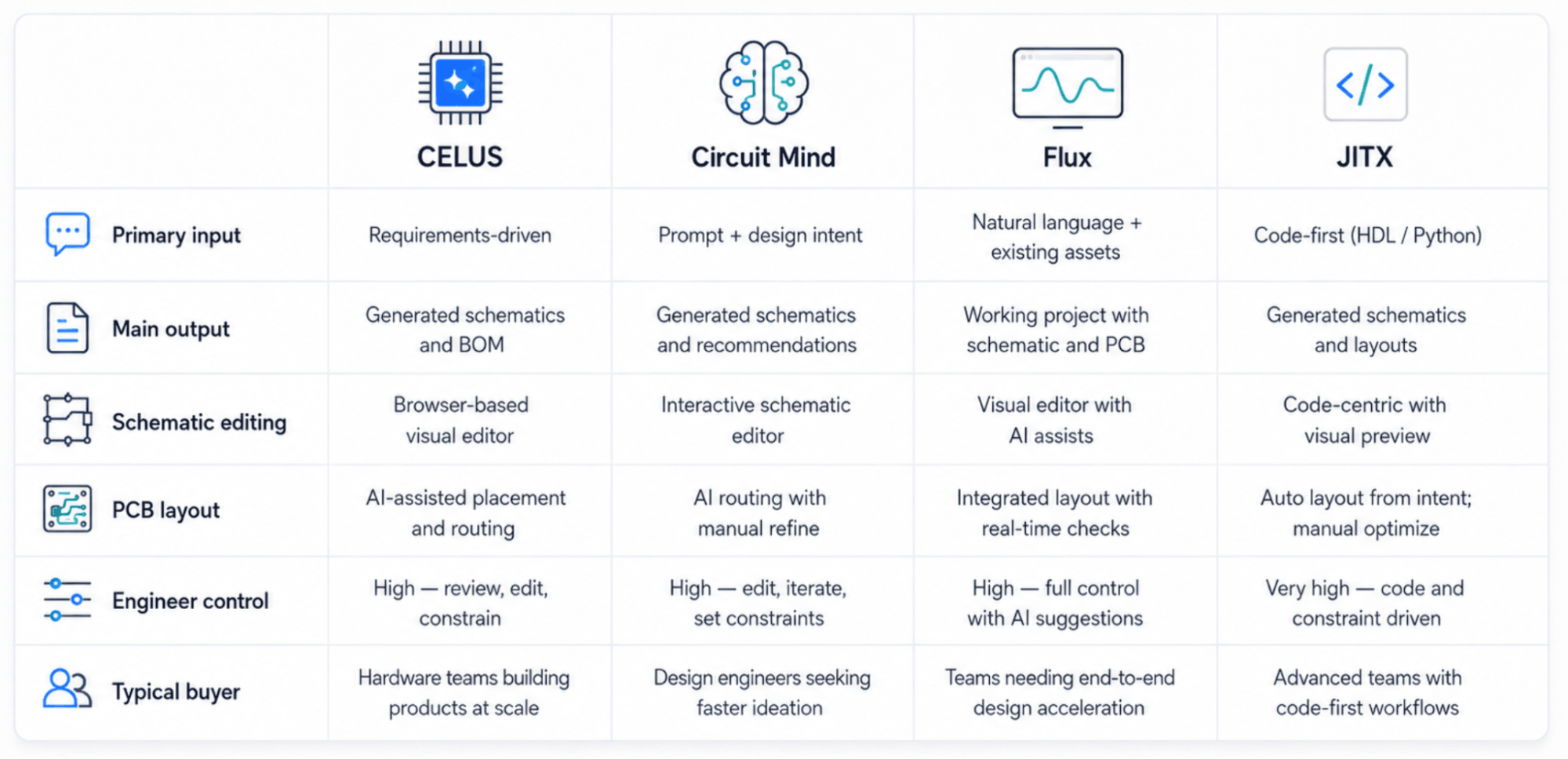
Four products illustrate how wide the category is. Celus and Circuit Mind generate schematics from requirements. Flux.ai puts a collaborative ECAD editor with an AI copilot in the browser. JITX generates circuits from code. As of August 2026, no single product covers requirements through manufacturing output without a conventional engineering review and downstream toolchain.
Celus works from requirements, searches components and generates a schematic that opens in an existing EDA tool, with native export to Altium, Cadence, Siemens, Fusion or KiCad and a BOM carrying supply-chain data and approved alternates. Circuit Mind also works from functional and non-functional requirements, with generated circuit options evaluated against constraints such as size, cost, power and availability.
Flux.ai and JITX both extend into board layout, but their interfaces are different. Flux is browser-native and visual. JITX expresses hardware in Python – requirements, constraints, stackups and engineering rules as code – and generates schematics and board layout from that model, including routing solvers and an HFSS interface.
Building a design surface around your own catalog? See what it takes
Check our offer.png)
Where AI already helps
Component research and selection
Part research begins before a meaningful schematic exists. An engineer may need a regulator with a specific input range, a radio module that meets a power budget or an alternate for a component affected by availability. AI can narrow a large search space, but the recommendation is useful only when the requirement behind it remains visible and the engineer can inspect the candidate before it enters the design.
A vendor-owned tool changes the search space itself. Instead of searching every possible part, a manufacturer can expose its own catalog plus approved supporting components. The commercial difference is important: the design surface becomes a product-discovery experience rather than a generic component search.
Turning requirements into an initial architecture
A battery-powered environmental sensor is a good example of why generated architecture needs editing. A first pass may produce power, sensing, an MCU, a radio and external interfaces. An engineer immediately adds the details that make those blocks credible: battery protection and a sleep-current budget, reset and boot straps, an SWD debug header, an antenna and matching network, ESD on external interfaces and decoupling throughout.
AI produced five blocks; an engineer immediately adds six more. That gap is the reason the output has to land somewhere editable rather than remain a diagram image or a text answer.
Drafting and reviewing schematics
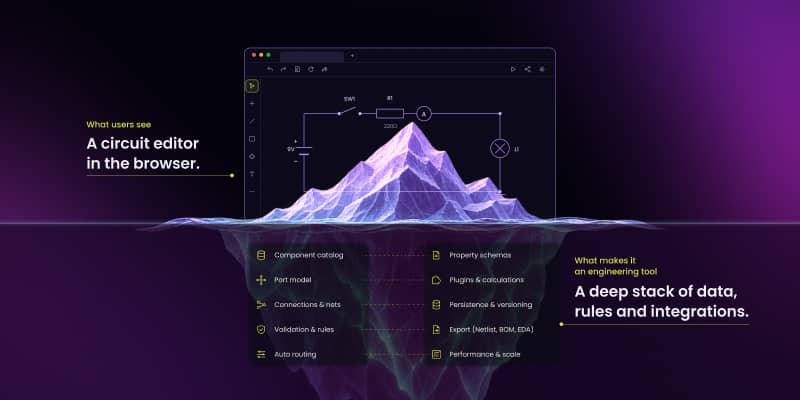
A generated schematic is most useful when every component, pin and connection becomes a real object in a model. The engineer can then inspect the design, change parts and preserve connectivity through edits. The screenshot is not the source of truth; the structured circuit is.
Where a team wants them, AI assists sit on top of the canvas as a layer: part suggestions, error checks and autocompletion. The canvas itself stays deterministic, and correctness review stays with the engineer and the EDA.
The deterministic layer matters more than the prompt
Requirements contain hidden constraints. "Create a low-power sensor board" says nothing about battery chemistry, operating temperature, target lifetime, radio protocol, certification, enclosure limits or manufacturing constraints. AI can help surface missing inputs, but assumptions have to remain visible before they become circuit decisions.
Connectivity is even less forgiving. A line that looks connected on screen still has to terminate on the correct component pin in the data model. A junction needs explicit electrical meaning. Moving a component may change wire geometry without changing the net itself.
ngDiagram is Synergy Codes' Apache 2.0-licensed Angular diagramming engine for interactive node-and-edge applications. In the circuit work, ngDiagram's generic ports are the primitive used to model component pins. In EDA vocabulary a port is something else – a hierarchical sheet connector – so this article says "pin" whenever it means a component terminal.
The public ngDiagram electric-circuit starter provides pin-to-pin connections with stable terminal identity, junction branching, merge-back, orthogonal routing, grid snapping and structured JSON export. It does not perform electrical simulation, ERC, footprint work, PCB placement, copper routing or manufacturing-file generation.
See how Synergy Codes built a schematic editor for OPAL-RT
Read case studyBuy an AI tool or build your own design surface?
The decision becomes clearer when the buyer is explicit.
| If you are... | Best direction | Why |
|---|---|---|
| An engineering team that needs schematics generated faster | Buy Celus, Circuit Mind or JITX | They are finished products built for engineering productivity. |
| A team that wants browser PCB design with AI | Buy Flux.ai | It already combines browser ECAD, collaboration and AI assistance. |
| A component vendor that wants customers designing with your parts, on your domain, feeding your CRM | Build | A vendor-owned configurator can restrict the catalog, enforce proprietary rules and connect directly to quoting, samples and lead capture. |
| An in-house team with deployment, security or integration constraints off-the-shelf products cannot meet | Build | The design surface and surrounding application can be shaped around the required environment. |
The four AI products above are finished tools sold to engineers. None of them can become a vendor's own configurator without changing the basic product model. If the problem is "design faster," buy a product built for that. If the problem is "we lose the socket at concepting," the design surface has to belong to the vendor.
That is also where ownership matters. ngDiagram is licensed under Apache 2.0, and Synergy Codes states that the client owns the custom product code built for its implementation. There is no per-seat dependency in the canvas layer, and a custom deployment can be self-hosted when the project requires it.
What a vendor-owned circuit tool actually does
A component manufacturer can give customers a browser experience where they choose an application, browse an approved catalog, place parts, connect compatible pins and send structured topology into the next engineering or commercial step. The important differentiators are not BOM generation or EDA export alone – Celus already covers those areas strongly. The differentiators are a single-vendor catalog, embedding on the vendor's own site, proprietary compatibility rules, direct connection to the vendor's funnel and ownership of the resulting product.
The public starter is a technical foundation, not a finished vendor configurator. Its documented exports are SVG, JPEG, DXF and JSON. The JSON carries component and pin-to-pin topology; mapping that data to a specific Altium, KiCad, OrCAD X or internal target is project-specific integration work.
See the Schematic Editor for electronic circuits case study and open the live ngDiagram circuit demo.
The public ngDiagram electric-circuit starter can be inspected before a custom project starts. The open code is useful because a buyer can evaluate the interaction model rather than buying from screenshots.
AI works best on top of a model engineers control
A generated component should become a real catalog item. A suggested connection should become a real relationship between pins. A proposed architecture should become an editable set of components and nets. That division of responsibility is practical: AI suggests, the circuit model stores the design, company rules constrain what users can create and downstream EDA handles the engineering stages outside the browser configurator's scope.
- Can AI design a complete PCB?
AI-assisted products can automate parts of component selection, schematic generation, review, placement and routing. As of August 2026, engineer review and specialist EDA still remain part of the path to a manufacturable board.
- What is AI PCB design software?
Software that automates part of the electronics design flow using machine learning, most commonly component selection against electrical and supply-chain constraints, schematic generation from requirements, design review and placement or routing. No current product completes a manufacturable board without engineer review.
- When should a company build an AI-assisted circuit design tool instead of buying one?
Build when the design surface itself is part of the product: customers must use a controlled catalog, proprietary compatibility rules matter, the editor has to live inside the company's own site or application, or the workflow must connect deeply to internal commercial systems.
- Where can you try the ngDiagram electric-circuit starter?
The starter is available through ngdiagram.dev, with documentation, a live circuit demo and a public repository. It provides pin-to-pin connections, junction branching and JSON export, so a team can evaluate the interaction model before committing to custom development.
As the founder and CEO of Synergy Codes, Maciej guides Fortune 500 companies and startups in identifying how custom diagramming solutions can transform their operations. With 15+ years in the field, he leads a team of experts who've delivered 170+ implementations across diverse industries, streamlining workflows and enhancing decision-making.

Find how we can help you enhance your software and win more deals
Contact us to discuss your project. After you submit the form, we’ll get in touch with you within 48 hours to arrange a call.

.jpg)