React Flow alternative for Angular: meet ngDiagram

React Flow ships no Angular build, so its only way into an Angular app is a React island. Read what that involves, and how ngDiagram compares.
React Flow is React-only. Using it inside Angular means bridging 2 runtimes. ngDiagram is a native Angular diagram library built on signals, dependency injection, and OnPush: one runtime, no bridge. The library is open source under Apache 2.0, first published to npm in August 2025, out of beta that November, with a stable 1.0 in February 2026.
React Flow has grown into the default for node-based UIs in React since its 2019 origins. Its maker, xyflow, also ships a Svelte version, Svelte Flow, but no Angular one. If you work in Angular and reach for React Flow, that gap is the wall you hit. Angular has a signals-native answer: ngDiagram, a React Flow alternative built for Angular.
Disclosure: I work at Synergy Codes, the company that created and maintains ngDiagram. I'm not one of the library's authors – I've built with it, just as I've built with React Flow – and I've tried to keep this comparison fair.
Why not just wrap React Flow?
Angular teams building workflow builders, org charts, pipeline editors, or data-flow canvases need a library to build the canvas on. Framework-agnostic options like GoJS and JointJS mean driving the diagram imperatively from outside Angular. GoJS is commercially licensed, while JointJS keeps its advanced tooling in the paid JointJS+ tier. React Flow is the most popular node-based UI library in React, so it keeps coming up.
React Flow's limit in Angular is that it ships no Angular build. Its only way into an Angular app is a React island: an isolated React root inside your page, shipping react, react-dom, and React Flow alongside Angular, reached through a hand-built bridge or a third-party wrapper.
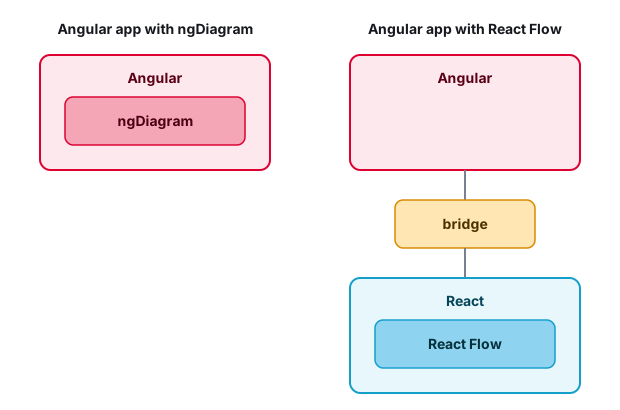
Wrapping works, and the diagram itself is fine. The cost sits at the boundary, in 3 places:
- A second runtime. Rendering React Flow means shipping
reactandreact-dom, code an Angular app would never load otherwise. - State stuck on the React side. React Flow keeps state inside React, where Angular's change detection can't see it. Every selection, drag, and connection you need in Angular you carry across by hand (more still on Zone.js, with
runOutsideAngular()andngZone.run()). - Maturity that stays on the React side. React Flow is proven in React apps. The bridge that holds it inside Angular is yours to write and keep working.
All three are the same problem: React Flow is not Angular. Remove the boundary and the costs go with it.
React Flow's mental model, native in Angular
If you know React Flow, ngDiagram will feel familiar. The mental model carries over: nodes, edges, a map of custom node types, and connection points on each node. ngDiagram needs Angular 18+, and its only runtime dependency is tslib. The foundation is pure Angular and a single runtime.
The difference is what those pieces are in Angular: a custom node is an ordinary Angular component that renders through Angular directly, with nothing to sync. The model is a swappable ModelAdapter, so your own store can be the single source of truth.
The same diagram, both ways
Before any custom code, here is the smallest thing each library does: a diagram with 2 nodes and an edge. A direct comparison of the minimal setups shows where the runtime difference lives.
React Flow uses hooks and (typically) controlled state:
// React Flow
import { useState, useCallback } from "react";
import {
  ReactFlow,
  applyNodeChanges,
  applyEdgeChanges,
  addEdge,
  Position,
  type Node,
  type Edge,
  type OnNodesChange,
  type OnEdgesChange,
  type OnConnect,
} from "@xyflow/react";
import "@xyflow/react/dist/style.css";

const initialNodes: Node[] = [
  {
    id: "1",
    position: { x: 100, y: 150 },
    data: { label: "Node 1" },
    // side handles, so the edge runs horizontally
    sourcePosition: Position.Right,
    targetPosition: Position.Left,
  },
  {
    id: "2",
    position: { x: 400, y: 150 },
    data: { label: "Node 2" },
    sourcePosition: Position.Right,
    targetPosition: Position.Left,
  },
];
const initialEdges: Edge[] = [{ id: "e1", source: "1", target: "2" }];

export default function DiagramComponent() {
  const [nodes, setNodes] = useState<Node[]>(initialNodes);
  const [edges, setEdges] = useState<Edge[]>(initialEdges);
  const onNodesChange: OnNodesChange = useCallback(
    (changes) => setNodes((nds) => applyNodeChanges(changes, nds)),
    [],
  );
  const onEdgesChange: OnEdgesChange = useCallback(
    (changes) => setEdges((eds) => applyEdgeChanges(changes, eds)),
    [],
  );
  const onConnect: OnConnect = useCallback(
    (params) => setEdges((eds) => addEdge(params, eds)),
    [],
  );

  return (
    <div style={{ width: "100%", height: 300 }}>
      <ReactFlow
        nodes={nodes}
        edges={edges}
        onNodesChange={onNodesChange}
        onEdgesChange={onEdgesChange}
        onConnect={onConnect}
      />
    </div>
  );
}
ngDiagram is a standalone component and a provider. State is a model you initialize:
// ngDiagram
// styles.scss: @import "ng-diagram/styles.css";
import { Component } from "@angular/core";
import {
  NgDiagramComponent,
  initializeModel,
  provideNgDiagram,
} from "ng-diagram";

@Component({
  imports: [NgDiagramComponent],
  providers: [provideNgDiagram()],
  template: `<ng-diagram [model]="model" />`,
  styles: `
    :host {
      display: flex;
      height: 300px;
    }
  `,
})
export class DiagramComponent {
  model = initializeModel({
    nodes: [
      { id: "1", position: { x: 100, y: 150 }, data: { label: "Node 1" } },
      { id: "2", position: { x: 400, y: 150 }, data: { label: "Node 2" } },
    ],
    edges: [
      {
        id: "e1",
        source: "1",
        // port ids shipped by the default node template
        sourcePort: "port-right",
        target: "2",
        targetPort: "port-left",
        data: {},
      },
    ],
  });
}
The two setups look almost the same: declare your nodes and edges, then hand them to a component. The difference shows up in Angular, where the ngDiagram version runs as written and the React Flow version needs a bridge first. You wrap the React root in a Web Component and push state in through a setter per prop. Events wire back out by hand, and you own the teardown.
The whole example is 2 nodes and an edge. Custom nodes are the next step.
A custom node, both ways
The setup is the same in both libraries: build a component, map it to a type name, then bind the map to the canvas. Each does it the way native to its own framework.
In React Flow, the node's props are typed as NodeProps, and its connection points are <Handle> elements:
// React Flow
import { Handle, Position, type Node, type NodeProps } from "@xyflow/react";

export function CustomNode({ data }: NodeProps<Node<{ label: string }>>) {
  return (
    <div className="custom-node">
      <Handle type="target" position={Position.Left} />
      <span>{data.label}</span>
      <Handle type="source" position={Position.Right} />
    </div>
  );
}
You register the component in a nodeTypes map, then pass that map to the canvas. A node renders with it when its type matches the registered key:
function DiagramComponent() {
  const nodeTypes = useMemo(() => ({ customNode: CustomNode }), []);

  return <ReactFlow nodeTypes={nodeTypes} nodes={nodes} edges={edges} />;
}
In ngDiagram, the node arrives as a typed input, and its connection points are <ng-diagram-port> elements:
// ngDiagram
import { Component, input } from "@angular/core";
import {
  NgDiagramPortComponent,
  type NgDiagramNodeTemplate,
  type Node,
} from "ng-diagram";

@Component({
  imports: [NgDiagramPortComponent],
  template: `
    <div class="custom-node">{{ node().data.label }}</div>
    <ng-diagram-port id="port-left" type="target" side="left" />
    <ng-diagram-port id="port-right" type="source" side="right" />
  `,
})
export class CustomNodeComponent implements NgDiagramNodeTemplate<{
  label: string;
}> {
  node = input.required<Node<{ label: string }>>();
}
You register the component in an NgDiagramNodeTemplateMap, then bind that map to the diagram. The node's type selects its template, just as nodeTypes does in React Flow:
@Component({
  template: `<ng-diagram
    [model]="model"
    [nodeTemplateMap]="nodeTemplateMap"
  />`,
})
export class DiagramComponent {
  nodeTemplateMap = new NgDiagramNodeTemplateMap([
    ["customNode", CustomNodeComponent],
  ]);
}
The node can reach the rest of your app through dependency injection. Inject a service and use it. The example uses an OrderService, the same service your forms and tables already call:
@Component({
  template: `<div class="custom-node">{{ status() }}</div>`,
})
export class CustomNodeComponent implements NgDiagramNodeTemplate<{
  orderId: string;
}> {
  private orders = inject(OrderService);
  node = input.required<Node<{ orderId: string }>>();

  status = computed(() => this.orders.statusOf(this.node().data.orderId));
}
Because status is a signal, the node updates when the order changes.
When I built an app with ngDiagram, the reuse showed up right away. Generic components I already shipped elsewhere in the product (forms, cards, status widgets) dropped into nodes and just worked.
How ngDiagram and React Flow handle extensibility
Sooner or later every diagram app needs a behavior its library doesn't ship. What happens then (extend, or fork) depends on the library's extensibility model. The two libraries take different routes.
React Flow extends through its React surface. The <ReactFlow> component exposes a wide prop surface (interaction flags, connection rules, styling), and in controlled mode the change callbacks (onNodesChange, onEdgesChange) and connection events (onConnect) let you intercept and reshape changes before you apply them. Beyond that, it is hooks and component composition.
ngDiagram has 3 layers. Most needs are already in the global config: snapping, zoom, grouping, linking, edge routing, keyboard shortcuts, and validation callbacks, all adjustable at runtime. Events like nodeDragEnded and selectionChanged cover reacting to what users do. And when config and events aren't enough, every model change runs through a middleware pipeline. This is how you extend ngDiagram without forking it: I've used the pipeline to add behavior the library doesn't ship by default, like connecting edges to other edges.
Locking a node to horizontal movement shows the pipeline in a few lines: intercept the moved nodes, keep the new X, and restore the Y they started at.
// Horizontal movement lock in ngDiagram
import type { Middleware } from "ng-diagram";

export const horizontalLock: Middleware<"horizontal-lock"> = {
  name: "horizontal-lock",
  execute: (context, next) => {
    const movedIds = context.helpers.getAffectedNodeIds(["position"]);
    if (!movedIds.length) {
      next();
      return;
    }
    const nodesToUpdate = movedIds.map((id) => ({
      id,
      position: {
        x: context.nodesMap.get(id)!.position.x,
        y: context.initialNodesMap.get(id)!.position.y,
      },
    }));
    next({ nodesToUpdate });
  },
};
You register it alongside the defaults and pass it to the diagram:
@Component({
  template: ` <ng-diagram [model]="model" [middlewares]="middlewares" /> `,
})
export class MyDiagramComponent {
  middlewares = createMiddlewares((defaults) => [...defaults, horizontalLock]);
  // ...
}
The library stays untouched and your behavior sits on top of it.
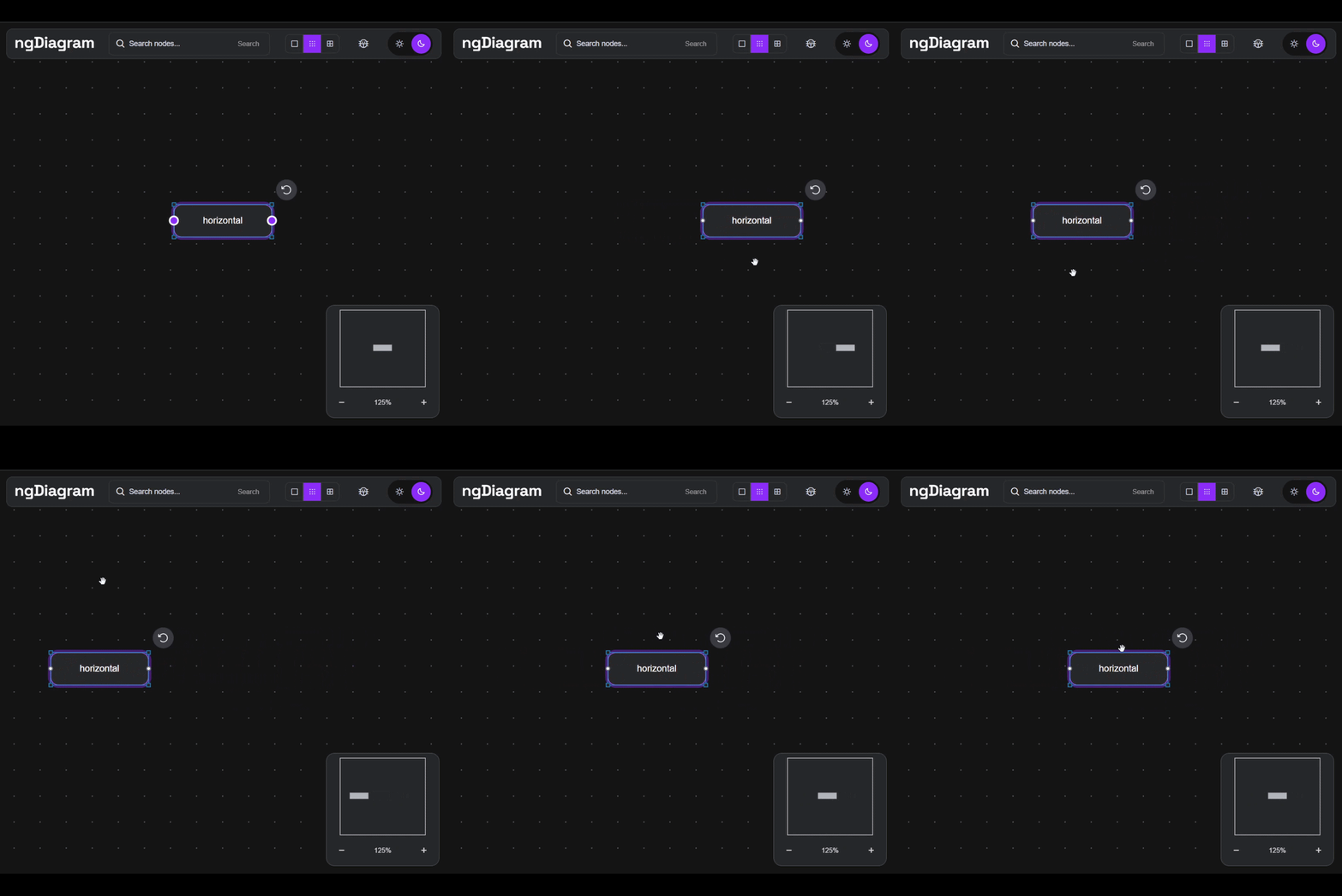
In React Flow the same rule goes in the controlled-mode onNodesChange callback: reset each position change's Y to the node's start value, captured in onNodeDragStart and held in a ref. A per-node extent can pin movement too, but the callback is the general mechanism for arbitrary rules.
// Horizontal movement lock in React Flow
// startYOf: start positions captured in onNodeDragStart, kept in a ref
const onNodesChange = useCallback((changes: NodeChange[]) => {
  const locked = changes.map((change) =>
    change.type === "position" && change.position
      ? {
          ...change,
          position: { x: change.position.x, y: startYOf(change.id) },
        }
      : change,
  );
  setNodes((nds) => applyNodeChanges(locked, nds));
}, []);
Both work. The difference is where the rule lives. In React Flow it sits in the component that renders the flow. In ngDiagram it registers once and applies to every change, whatever triggered it.
The middleware guide covers the full pipeline: intercepting, transforming, or canceling any change.
ngDiagram vs React Flow, feature by feature
ngDiagram covers the same core as React Flow, with a feature set shaped by its creators' decade of client diagramming work: the capabilities that kept proving necessary in real projects. I used those features in my own project, and they covered what I needed. For an Angular team, the deciding factor is how natively each feature fits.
Current bundle sizes: bundlephobia for ng-diagram and @xyflow/react.
How mature is ngDiagram?
ngDiagram hit a stable v1.0 in February 2026 and is at v1.2 as of mid-2026. It is open source under Apache 2.0, tracks the latest 3 Angular versions, and is built by Synergy Codes.
Development has not slowed since: each release brings DX improvements and features the community asked for.
Beyond examples, the team ships maintained starter-kit templates that you clone and customize for your own use case, with more to come. They come from the same place as the feature set: what client work kept proving necessary.
Developers are already building the first projects using it, collected in the growing showcases.
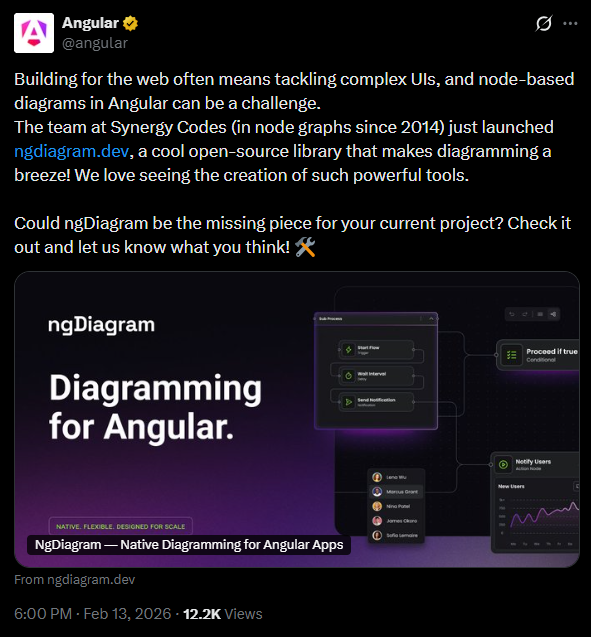
The library has been well received: it has passed 500 GitHub stars, the community has started writing its own tutorials on Medium, and the official Angular account shared ngDiagram in February 2026.
When to choose which, and how to start
The rule tracks your framework, with one exception:
For a fresh Angular build, I don't see a reason to start with React Flow. The framework boundary alone is enough to prefer a native option. Wrapping is usually chosen for React Flow's maturity. The question is whether the boundary cost is worth it in your app.
The exception is if you already run React Flow inside Angular. A rewrite tomorrow is rarely worth the risk. Keep it, and revisit when the bridge starts to bite: a major framework upgrade, nodes that need deeper access to your Angular app, or the next big diagram feature.
Sticking with what you know is reasonable, but in Angular, React Flow adds one more thing to maintain: the bridge between the 2 frameworks. A native library drops it. Try ngDiagram and see how it feels. Adding it takes one install, one provider, and a styles import. Start with the interactive examples.
Building a custom diagram editor, or taking an existing one further, is the kind of work Synergy Codes does.
- Can I use React Flow with Angular?
React Flow is React-only, so using it in Angular means running a React root inside your page via a third-party wrapper or a hand-built bridge. It works, but it ships
reactandreact-domand leaves you a boundary to maintain. - What is the React Flow alternative for Angular?
ngDiagram is a native option built on Angular signals, so no React runtime and no bridge. A node is an ordinary Angular component, so your existing components, services, and forms work inside it.
- Can I reuse my existing Angular components inside a diagram?
In ngDiagram, yes, a node is a real Angular component, so a form, card, or status widget you already ship drops straight into a node, and that node injects the same services as the rest of your app. With React Flow you would rebuild that component in React first.
- Is ngDiagram production-ready?
ngDiagram reached a stable 1.0 in February 2026 and is at v1.2 by mid-2026, built and maintained by Synergy Codes, a diagramming agency with over a decade of experience. It covers the same core as React Flow, and the community has started building on it, though it does not yet have years of production mileage.
- What license does ngDiagram use?
ngDiagram uses the Apache 2.0 license and is fully open source, with the source on GitHub. Its only runtime dependency is
tslib. - Which Angular versions does ngDiagram support?
ngDiagram needs Angular 18 or newer and stays compatible with the latest 3 Angular versions. It uses signals and runs under OnPush.
Software Developer at Synergy Codes, where he has spent 5+ years building diagram editors for automotive manufacturing, conversational AI, and electrical engineering clients. Wojciech works in Angular, TypeScript, and ngDiagram, previously in React with GoJS. He built the open-source ngDiagram org chart template.

Find how we can help you enhance your software and win more deals
Contact us to discuss your project. After you submit the form, we’ll get in touch with you within 48 hours to arrange a call.



.jpg)